The accountant account guide

Everything an accountant does from their panel: taking deposit and withdrawal requests from Telegram bots and approving them, payment methods and automatic checks, offers and rewards, statements and security — with a picture of every page.

Monthly subscription
40 USDT
Per accountant, paid in USDT from «My subscription».
Request the service now
Message us to get your bot within minutes.
Running now
Bots: 5 · Channels: 5
Bots and channels of subscribed accountants, linked below.

1. Getting started

What is Eagle?

Eagle is a control panel that runs your Telegram bots to top up and withdraw your players' balances on the Agent platform (your cashier). A customer asks the bot for a deposit or a withdrawal and pays you with the payment methods you choose; you approve with one tap in the panel or in Telegram, the player's account is credited through the API automatically, and everything lands in your statement.

  • One or more Telegram bots with your name and picture, working around the clock in Arabic and English.
  • Player accounts created, linked, topped up and withdrawn from automatically on the platform, without opening the cashier.
  • Payment methods of your choice: Syriatel Cash, ShamCash, USDT, PayPal, bank transfer and more, some of them checked automatically.
  • Ready-made tools to grow deposits: gift codes, a welcome offer, referrals, loss compensation, a loyalty program with a wheel of fortune, and the «Crazy cashier».
  • An exact statement, instant notifications on your phone and in Telegram, and an audit log of everything in your account.
The monthly subscription price at the top of this page is read live from the system and paid in USDT. Message us to get your bot within minutes.
How your account is set up

The administration does all the technical set-up; you only send your details, then receive the panel link, your sign-in and your bot's link.

  • You send: your name and the cashier''s currency, the cashier''s details (username, password and User Id), the bot name your customers see, a support contact, and your payment methods with their rates, limits and exchange rate if any.
  • The administration creates: your accountant account (email and password), the link to your cashier (Agent account), the bot and its activation, the payment methods, and a promotion channel if you want one.
  • On your first sign-in: change the password, enable two-step verification, then open your bot and press Start so requests reach you in Telegram.
Do not use the cashier's details in another program or bot, and do not change its password without telling the administration first: deposits and withdrawals stop until it is updated.

Dashboard

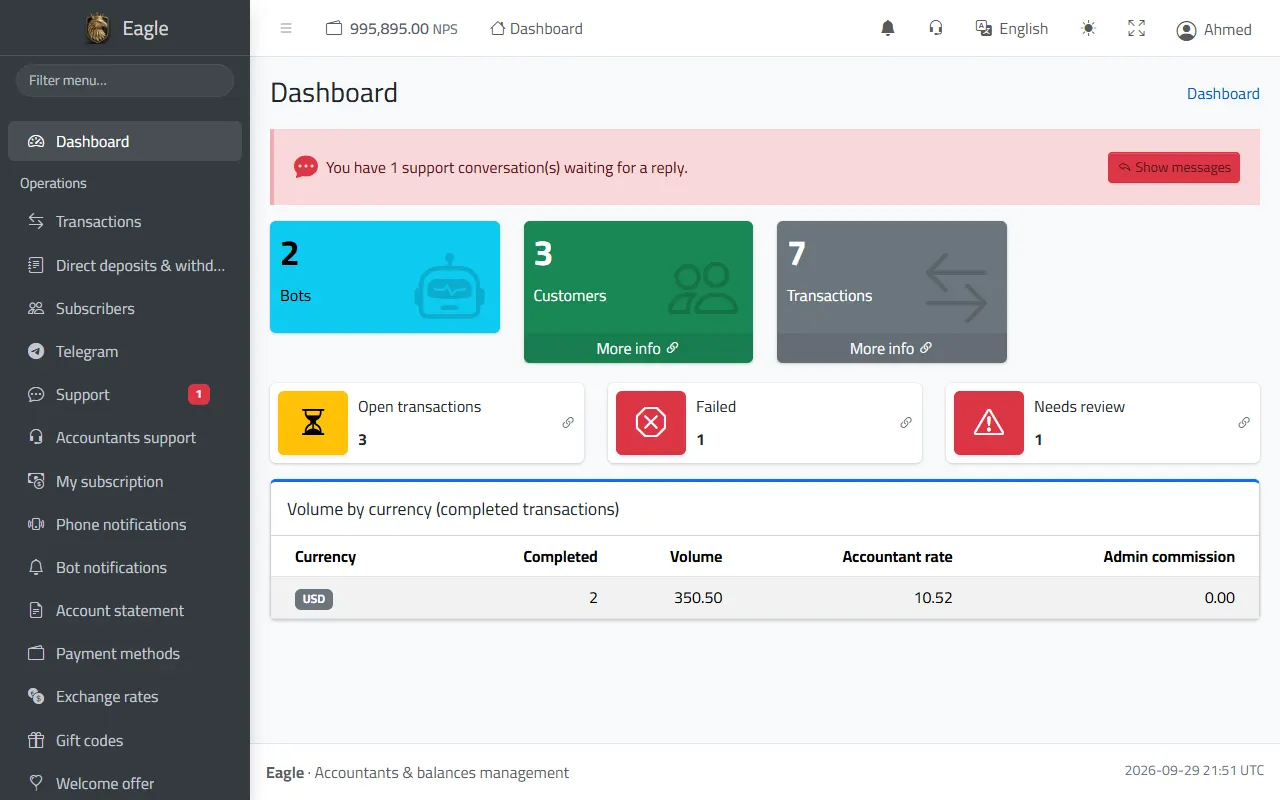
The first thing you see after signing in: a live summary of your bots, with the sidebar menu of every section and a search in it.

  • How many bots, customers and operations you have, each with a quick link.
  • Open operations (awaiting your approval or in progress), failed ones, and those that need a review.
  • Volume by currency of the completed operations: their count, amounts and the accountant''s rate.
  • A notice at the top when support conversations are waiting for your reply.
  • In the top bar: the live balance of your Agent account, the notification bell, messages to the administration, language, dark mode and full screen.
Dashboard: bots, customers and operations, open and failed operations, and volume by currency.

2. Daily operations

Operations: deposit and withdrawal requests

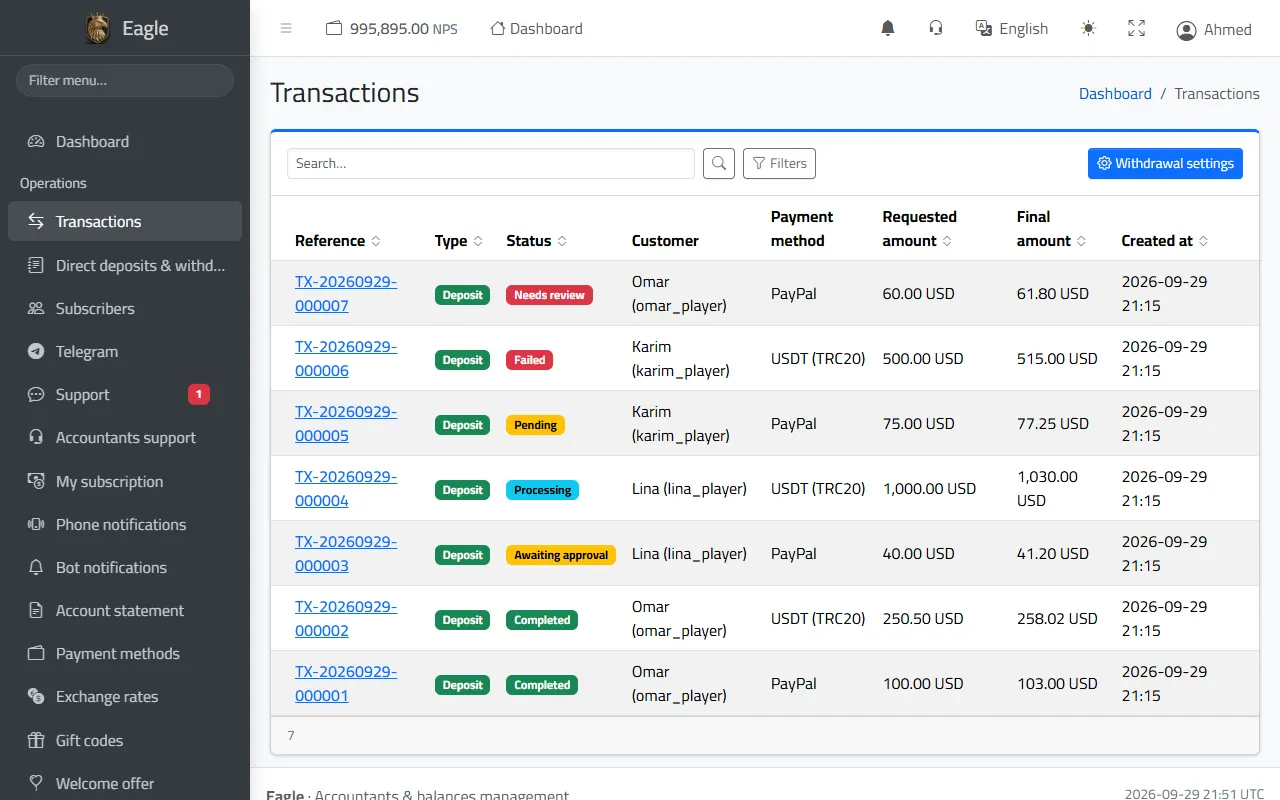
Every deposit or withdrawal request from the bot or the customer portal appears here with its status, filterable by status, type, date, bot and payment method.

  • Statuses: pending (no proof yet), awaiting approval, processing, completed, failed, needs review, cancelled.
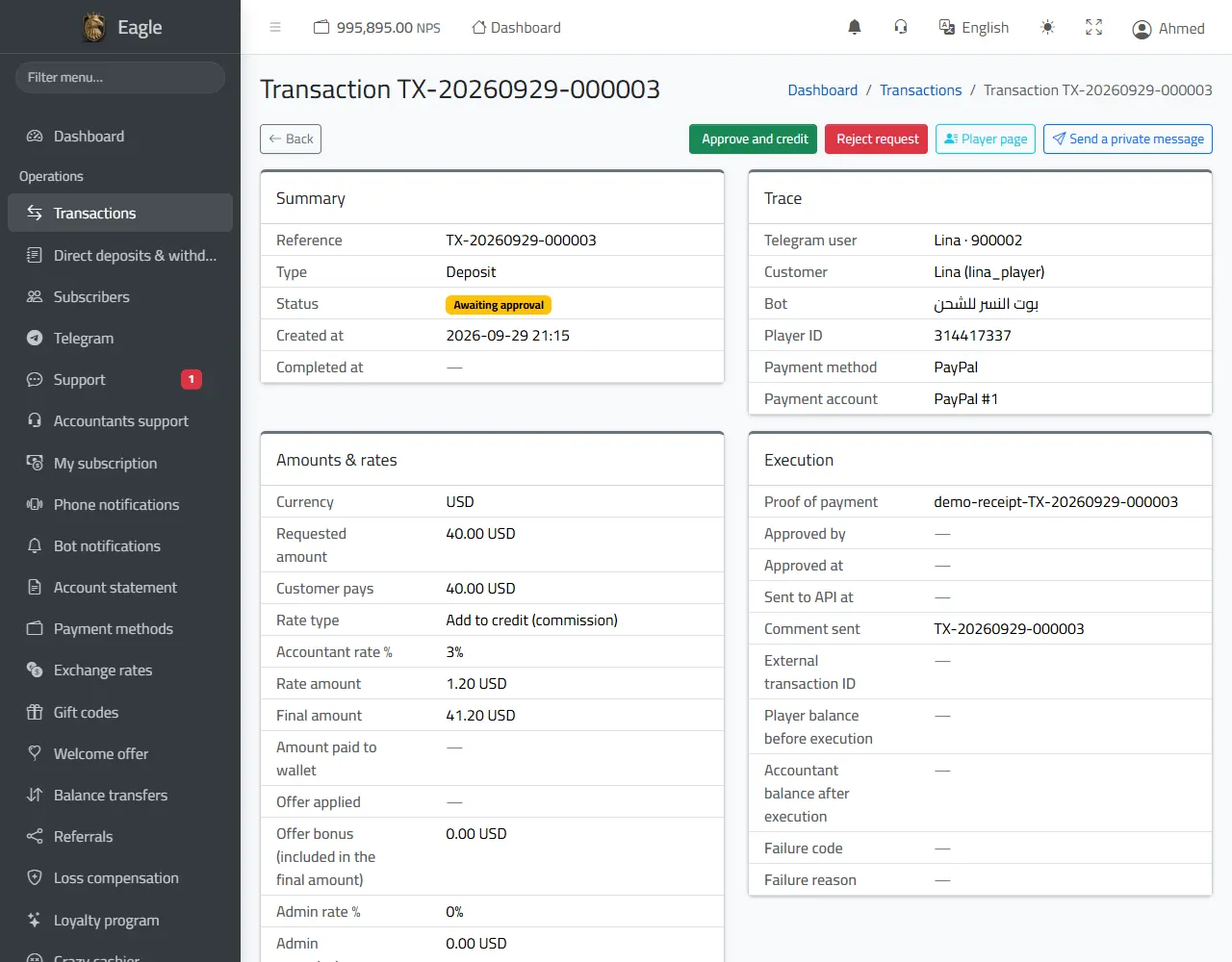
  • The operation page shows the payment proof, the requested amount and what the customer paid, the rate and any offer applied, and the final amount to be credited.
  • «Approve and credit» sends the amount to the player''s account through the API at once; «Reject request» cancels it and tells the customer.
  • You can approve in the panel or from the bot''s message in Telegram; the first approval wins, so a request is never credited twice.
  • From the operation page you go straight to the «Player page» or «Send a private message» to the customer.
Any unconfirmed result from the platform (a timeout or an unclear reply) goes to «Needs review» and is never retried automatically, which protects you from double credits.
The operations list with statuses, amounts and filters.
A deposit request awaiting approval: «Approve and credit» or «Reject», with the amounts and rates.

Withdrawal requests and holding the amount

The customer asks the bot for a withdrawal, picks how to receive it and enters their account details; you send the money and confirm, and the amount is taken from their player's balance.

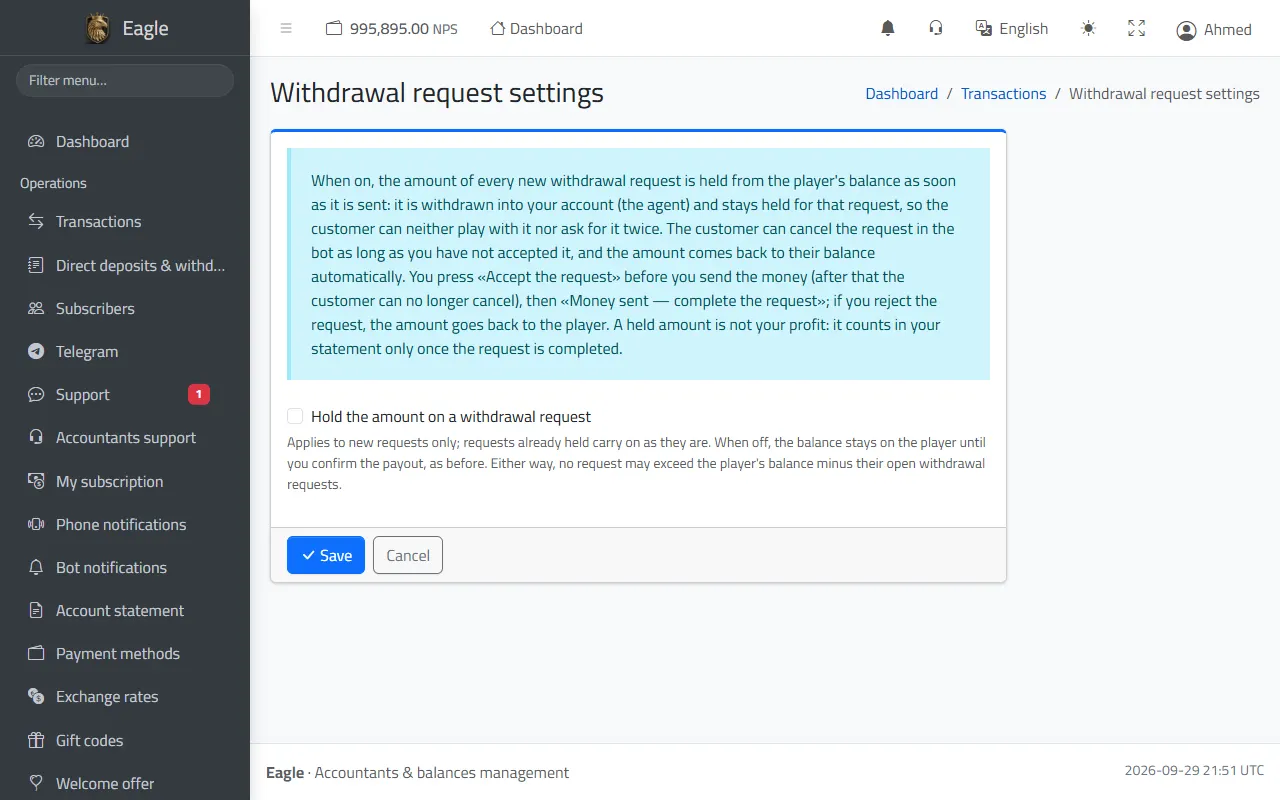
  • «Hold the amount on a withdrawal request» (optional, in «Withdrawal settings»): the amount leaves the player''s balance as soon as they ask and stays held for that request, so they can neither play with it nor ask for it twice.
  • With the hold you press «Accept the request» first (the customer can no longer cancel), then «Money sent — complete the request»; rejecting returns the amount to the player automatically.
  • Without the hold the balance stays with the player until you confirm the payment, and no request above their balance minus their open requests is accepted.
  • With ShamCash and Syriatel Cash through API SYRIA you can pay the withdrawal from the panel in one click, as long as the administration allows automatic payouts.
Withdrawal settings: holding the amount when a withdrawal is requested.

Direct deposits and withdrawals log

Every operation on a player's balance that did not come from a bot request: direct deposits and withdrawals from the player page, gift codes, referral earnings, loss compensations, loyalty rewards, the welcome offer and balance transfers.

  • Each operation has a reference, a status (completed, failed, unknown result) and the Agent balance after it.
  • A direct deposit or withdrawal from the panel asks for your account password every time.
  • An operation with an unknown result is settled by the system administrator and never retried automatically.
  • All of them appear in your statement where they belong.

Subscribers

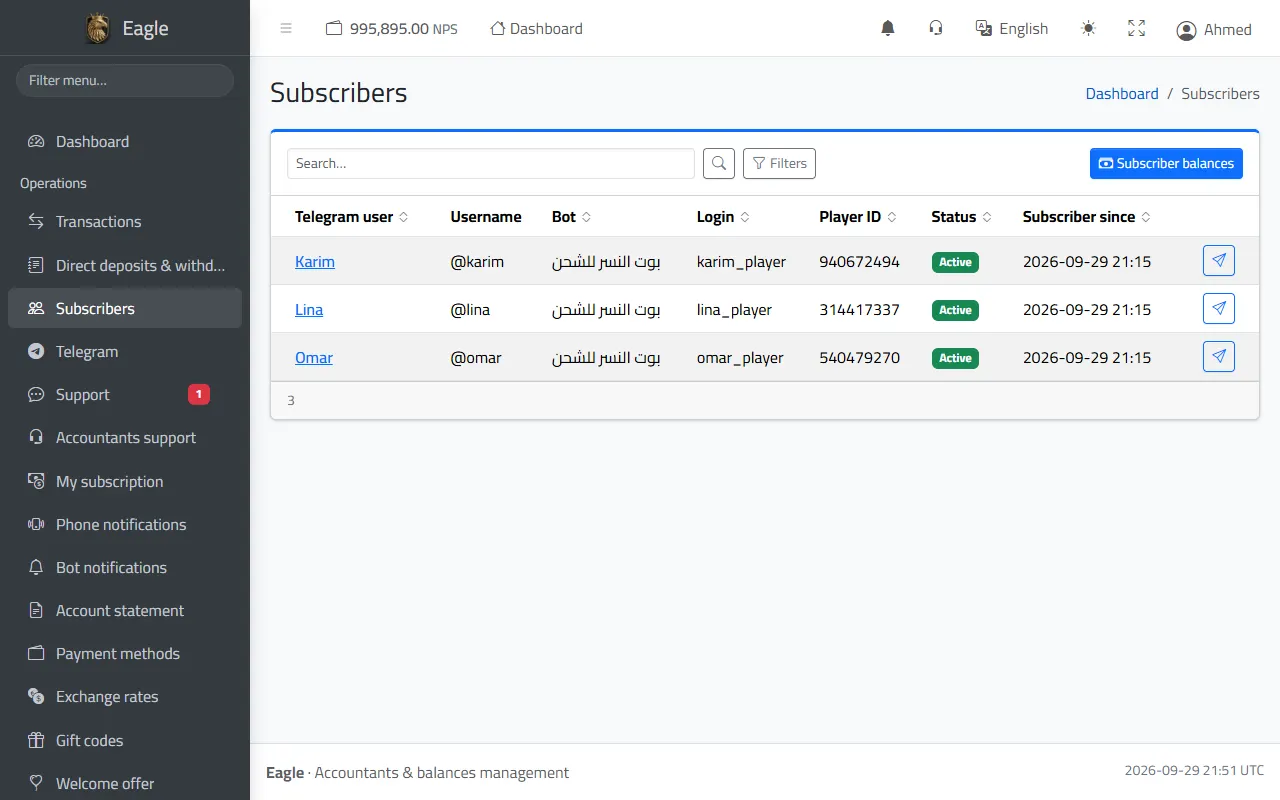
Everyone who started one of your bots: Telegram account, bot, login and player number, status and date.

  • The subscriber page: their details, the support conversation, the player page, and the usernames of their Telegram account.
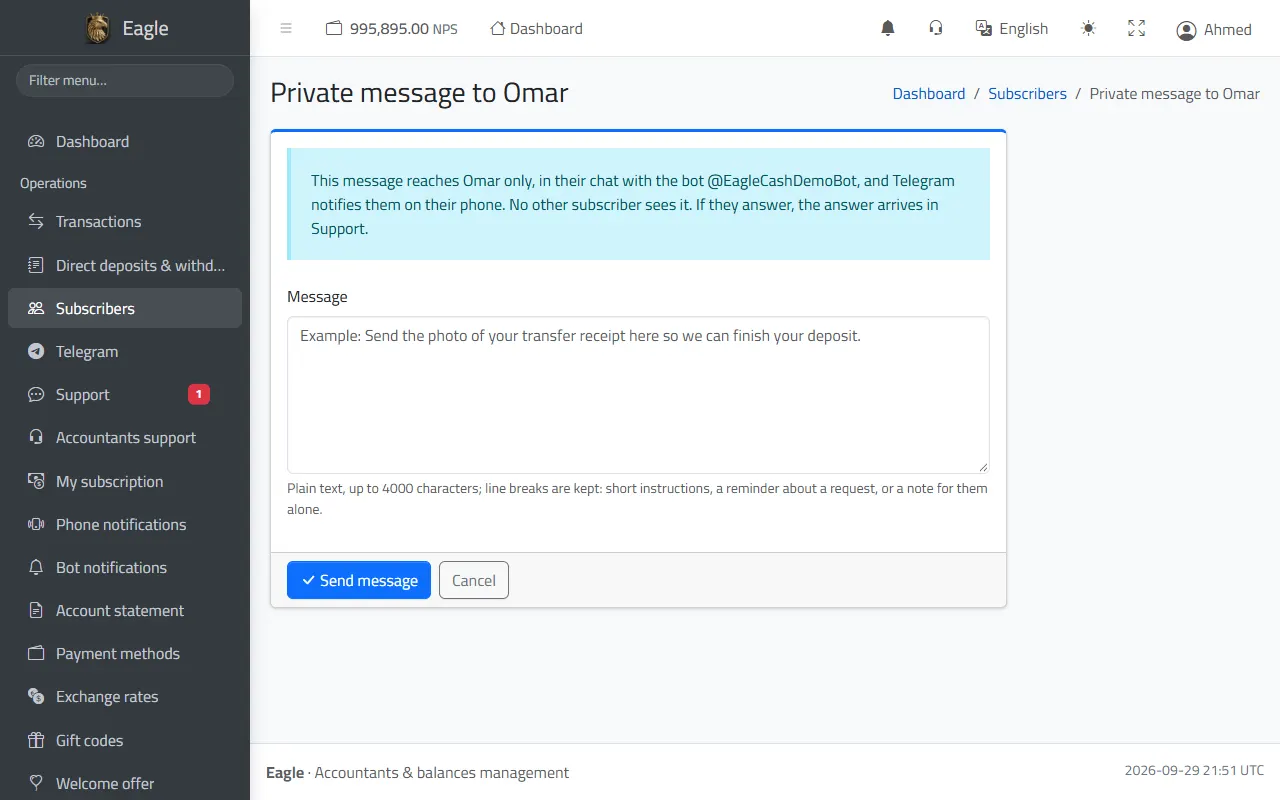
  • «Send a private message»: a message to one subscriber inside the bot, with a notification on their phone; their reply reaches your support inbox.
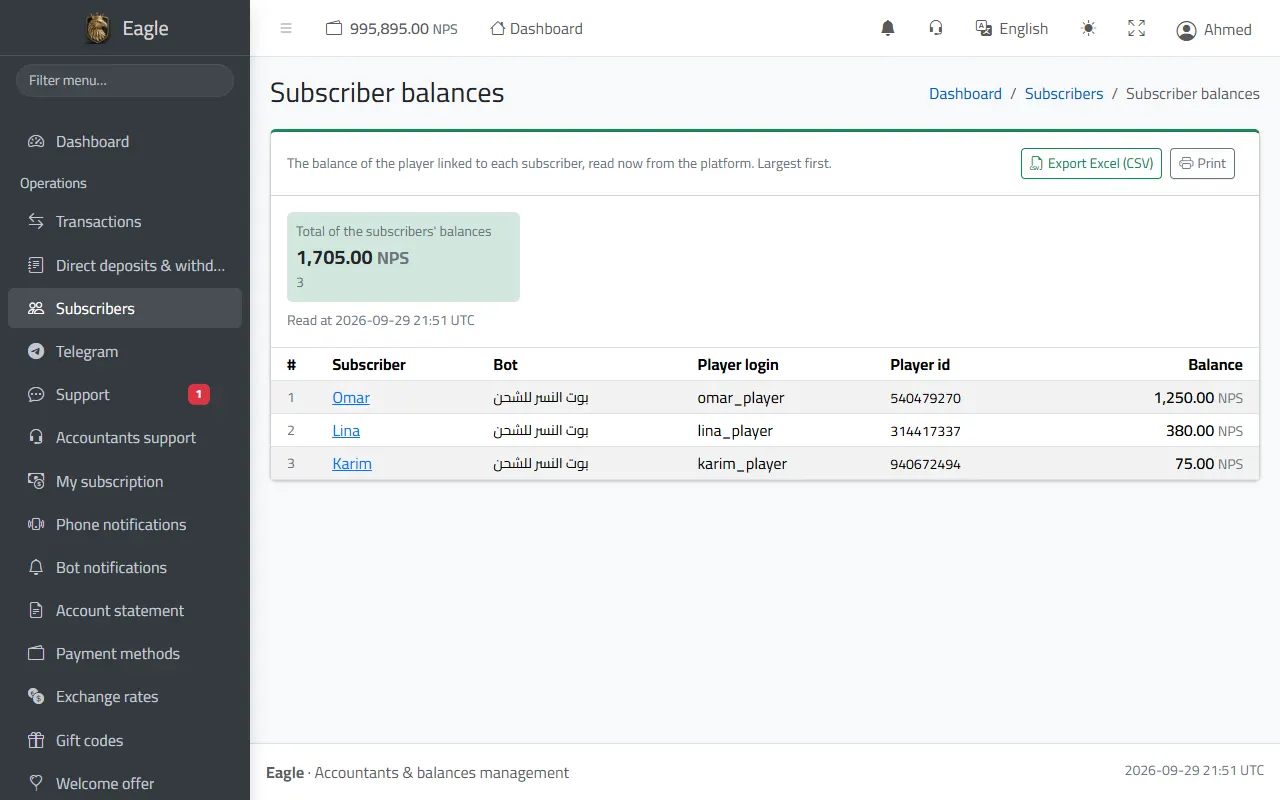
  • «Subscriber balances»: the balance of every linked player read live from the platform, largest first, with the total, an Excel export and printing.
Subscribers: Telegram account, bot, login and player number.
Subscriber balances read live from the platform, with the total.
A private message to one subscriber inside the bot.

Telegram: account audit and username limit

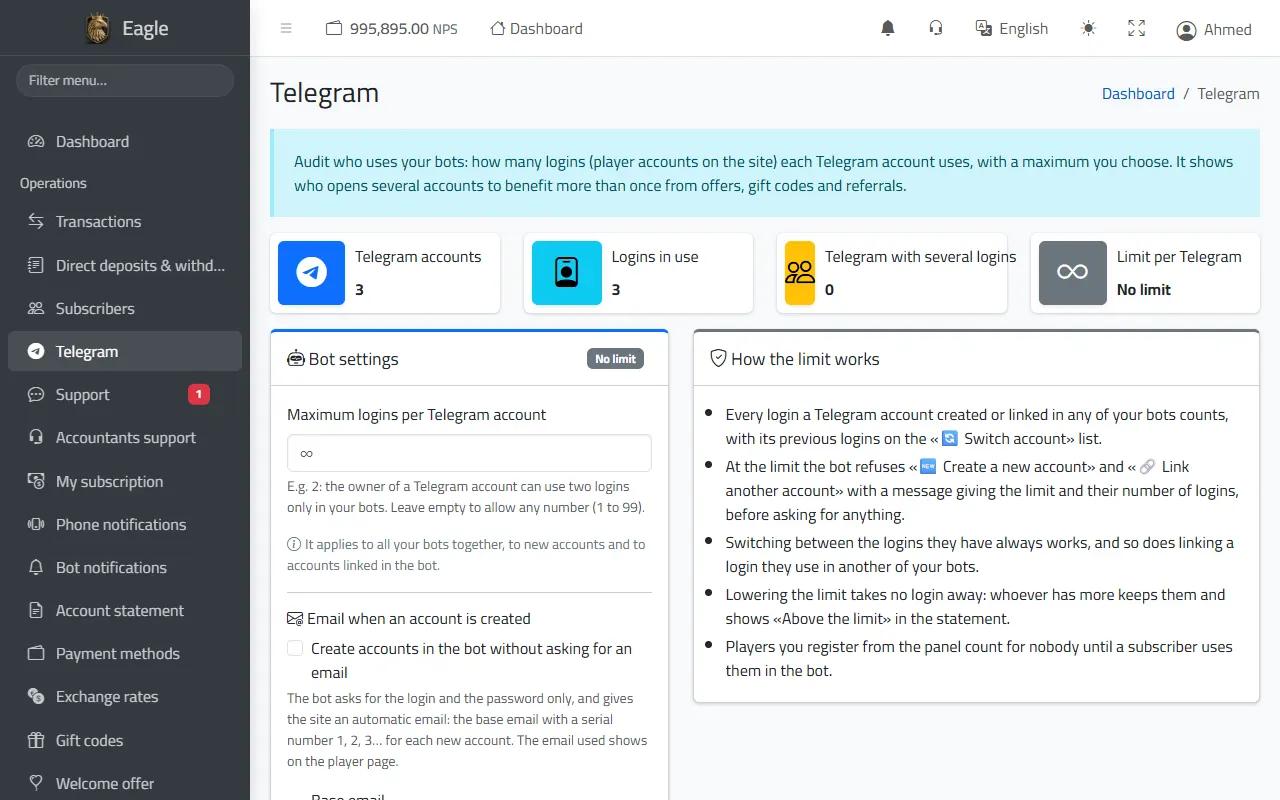
A report of how many player accounts each Telegram account uses in your bots, to spot people who open several accounts to benefit more than once from offers, gifts and referrals.

  • A maximum number of usernames per Telegram account that you choose (or no limit); at the limit the bot refuses to create or link another account, while switching between the existing ones keeps working.
  • Account creation in the bot without asking for an email: each new account gets a numbered email based on your main address.
  • The usernames of each Telegram account, and a CSV export of the report.
Telegram account audit and the username limit per account.

Customer support

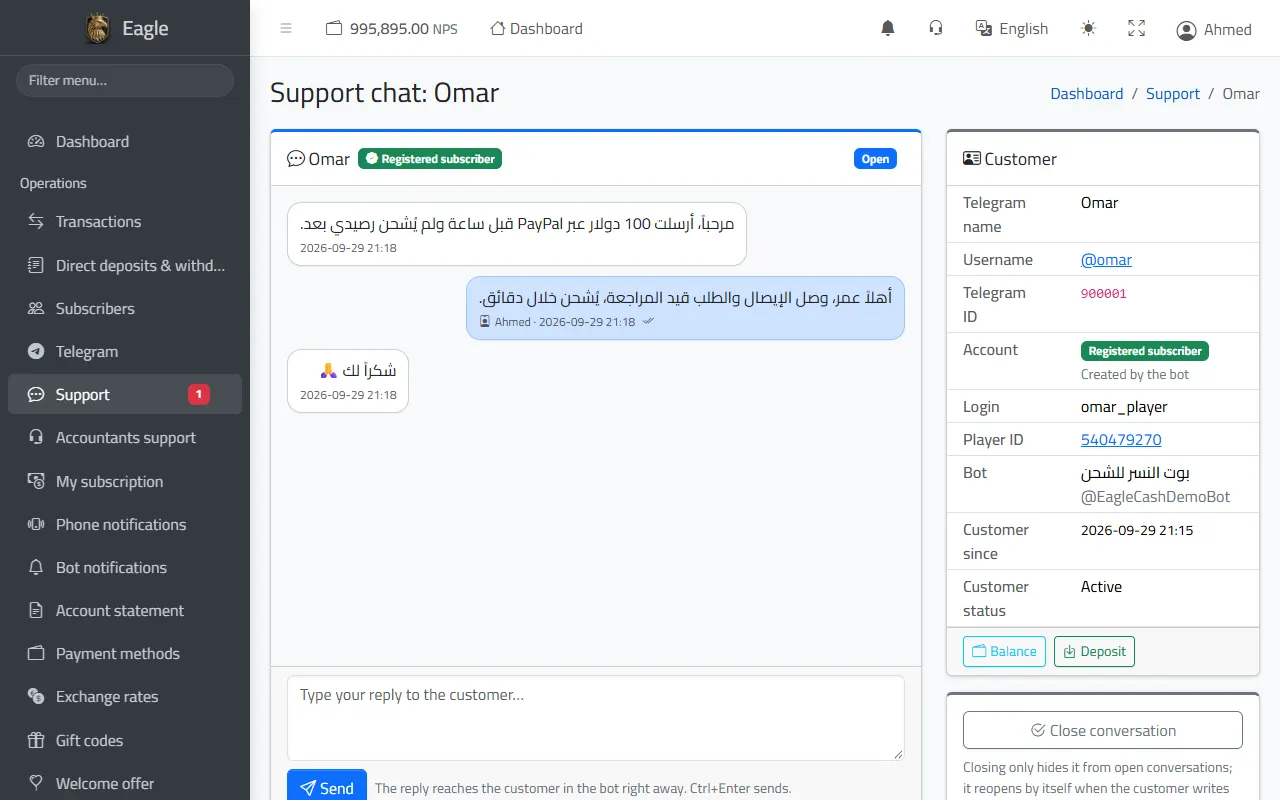
Anything a customer writes in the bot outside the deposit and sign-up steps reaches you here at once, with an alert in the panel and in Telegram; your reply reaches them inside the bot.

  • Filters: unread, open, closed, all, and a search.
  • Next to the conversation, the customer card: account, player number, bot, and a button to see and top up their balance.
  • Closing a conversation only hides it; it reopens by itself when the customer writes again.
A support conversation with a customer, and the customer card next to it.

Accountants support (messages with the administration)

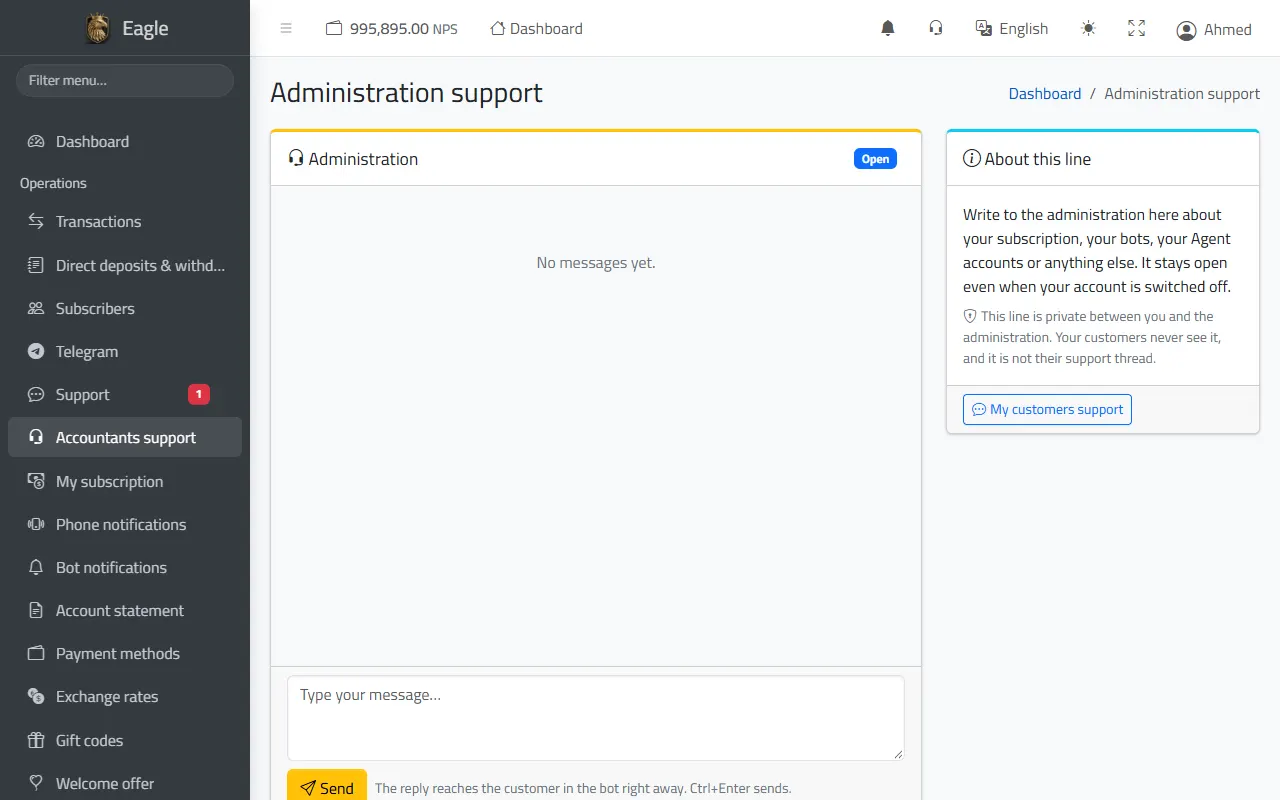
A private line between you and the system administration about your subscription, bots, Agent accounts or anything else. Your customers never see it, and it stays open even if your account is suspended.

  • Your messages reach the administration at once; their replies appear here and notify you.
  • Quick access from the headset icon in the top bar.
Accountants support: messages with the administration.

Notifications: bot, phone and bell

Three alert channels work together so you never miss a request.

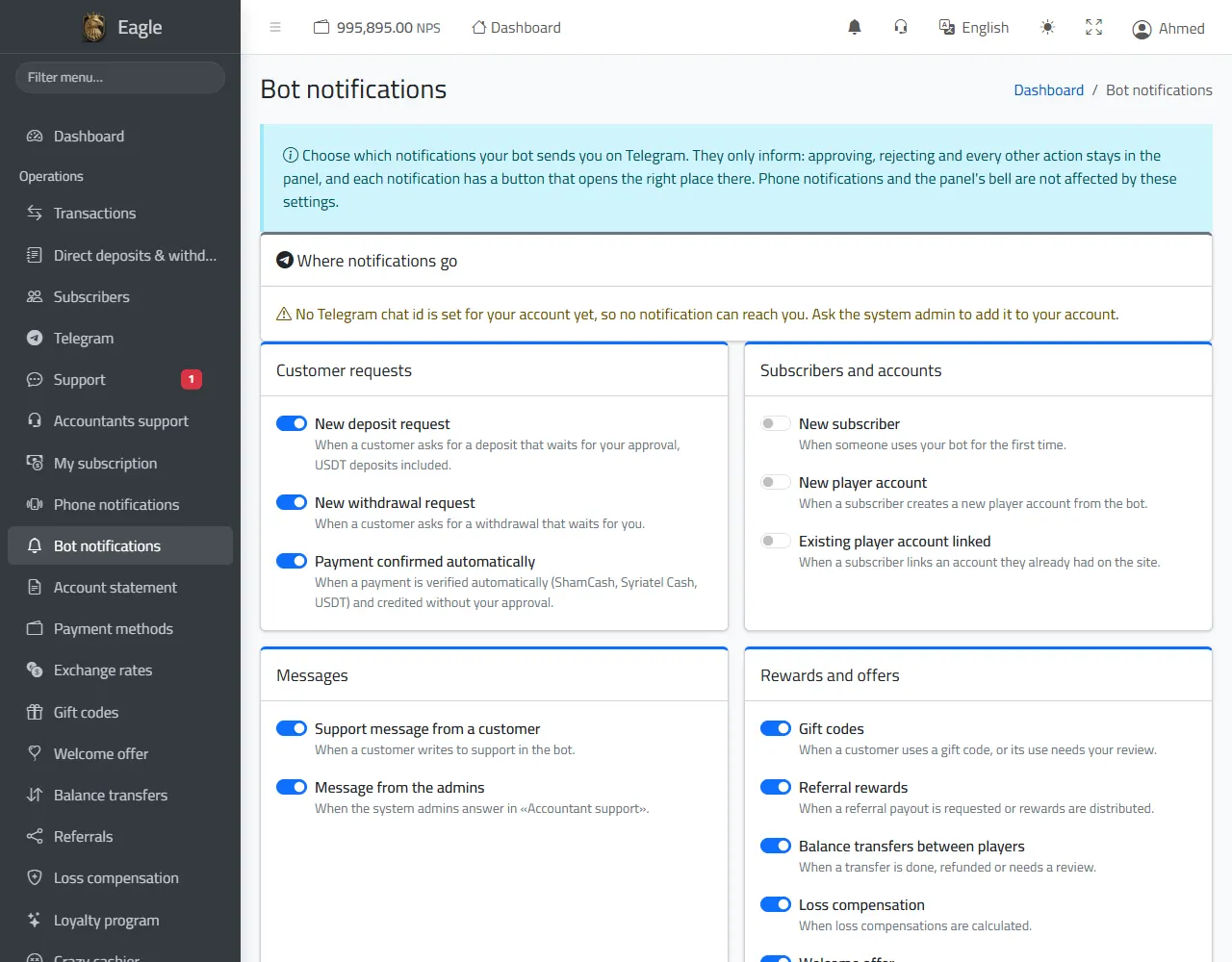
  • «Bot notifications»: choose what reaches you in Telegram: deposit and withdrawal requests, automatically confirmed payments, new subscribers, support and administration messages, gifts, referrals, compensations, loyalty and the «Crazy cashier», and sign-in alerts for your account.
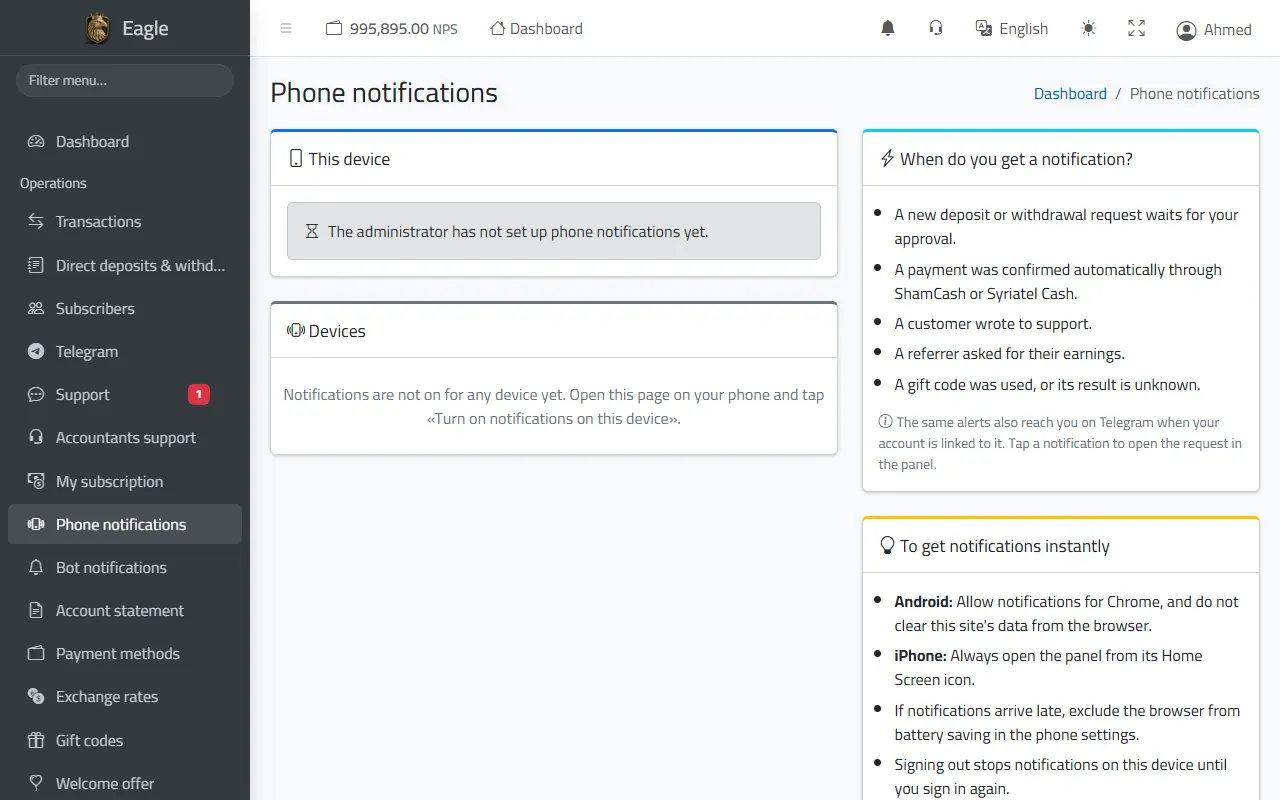
  • «Phone notifications»: enable them on your phone to get requests instantly, even with the browser closed (on iPhone, from the app icon on the home screen).
  • The panel bell keeps the last 200 notifications; tapping one opens the request directly.
Install the panel as an app on your phone with the «Install the app» button: it opens in one tap and notifications work better.
Choosing the bot notifications that reach you in Telegram.
Enabling phone notifications, and the enabled devices.

Account statement

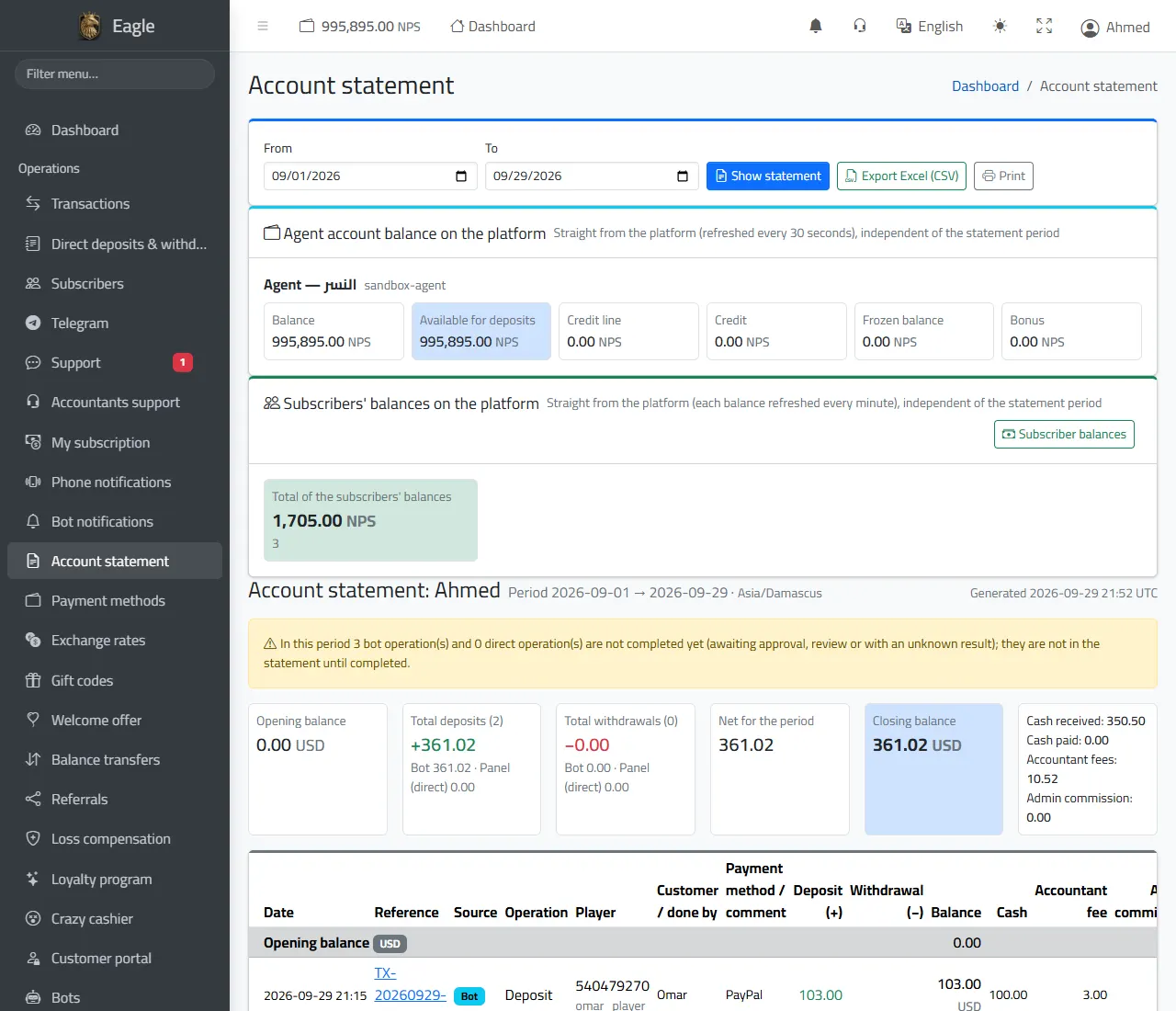
A financial statement for any period you choose, in the reports' time zone: opening balance, total deposits and withdrawals (bot and panel), the period's net and the closing balance.

  • For each operation: date, reference, source, player, customer, payment method, deposit or withdrawal, cash received or paid, and your fee.
  • The live balance of your Agent account on the platform, and the total of your subscribers'' balances.
  • Excel (CSV) export and printing.
  • Only completed operations count; unsettled ones are mentioned in a notice above the statement.
Account statement: live Agent balance, subscriber balances, and the balances and totals of the period.

3. Payment methods and prices

Payment methods

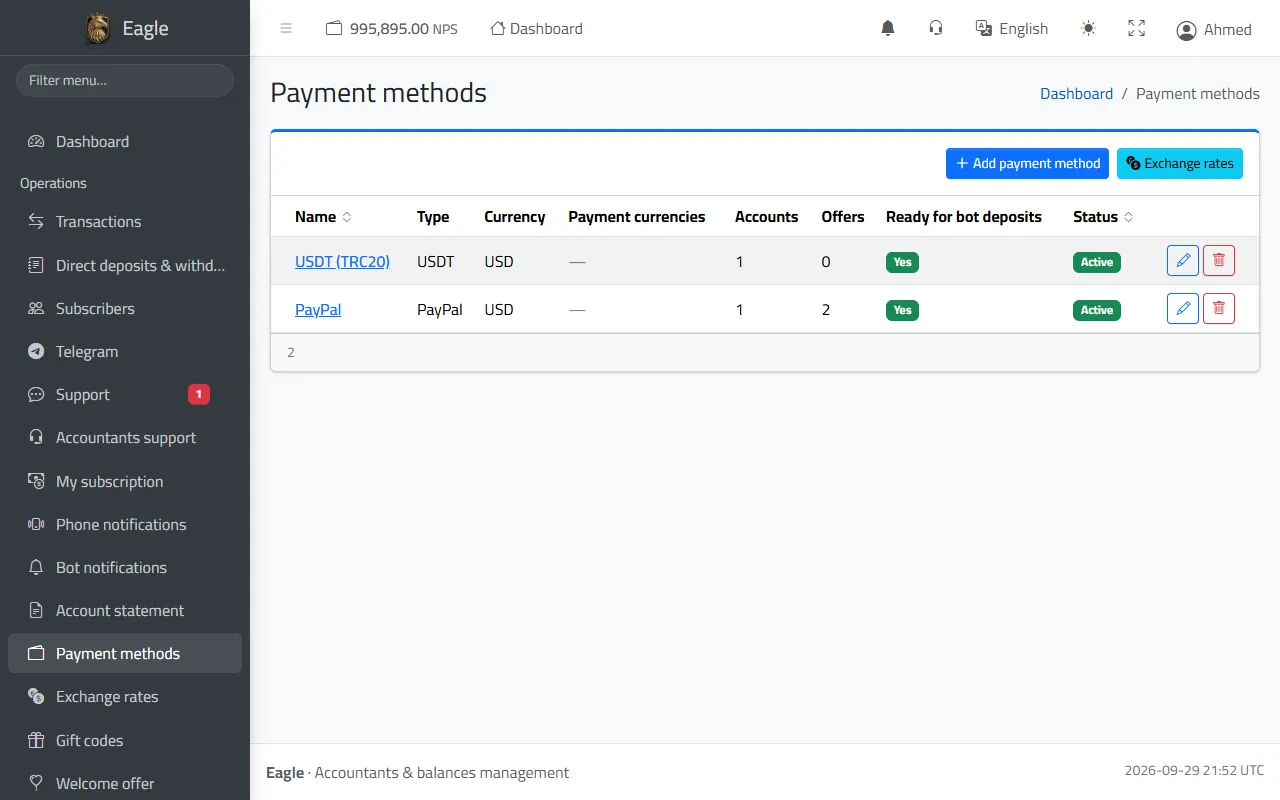
You decide how your customers pay you and how you pay them, each method with its own settings.

  • Types: Syriatel Cash, ShamCash, USDT, crypto, PayPal, bank transfer, or another method.
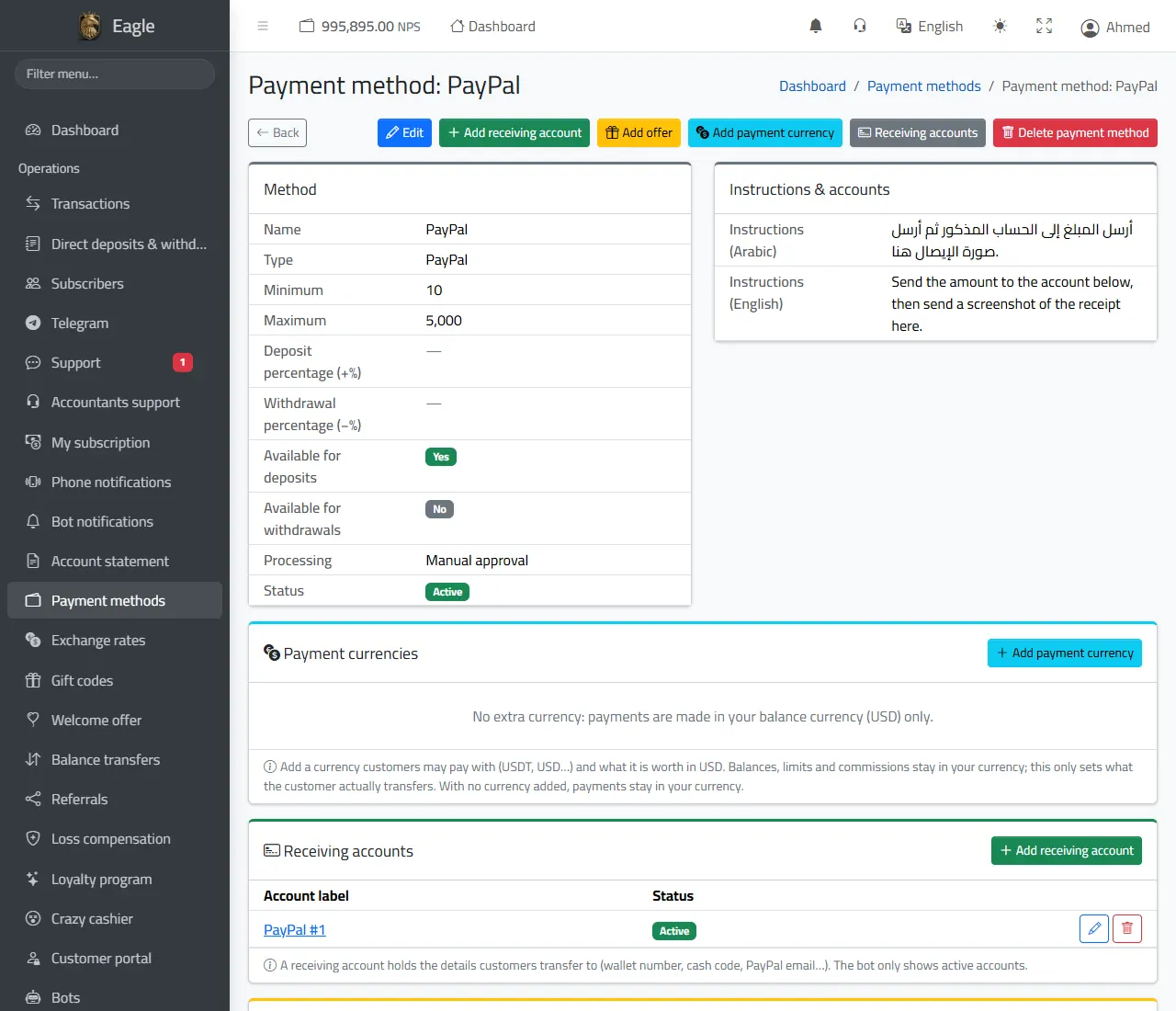
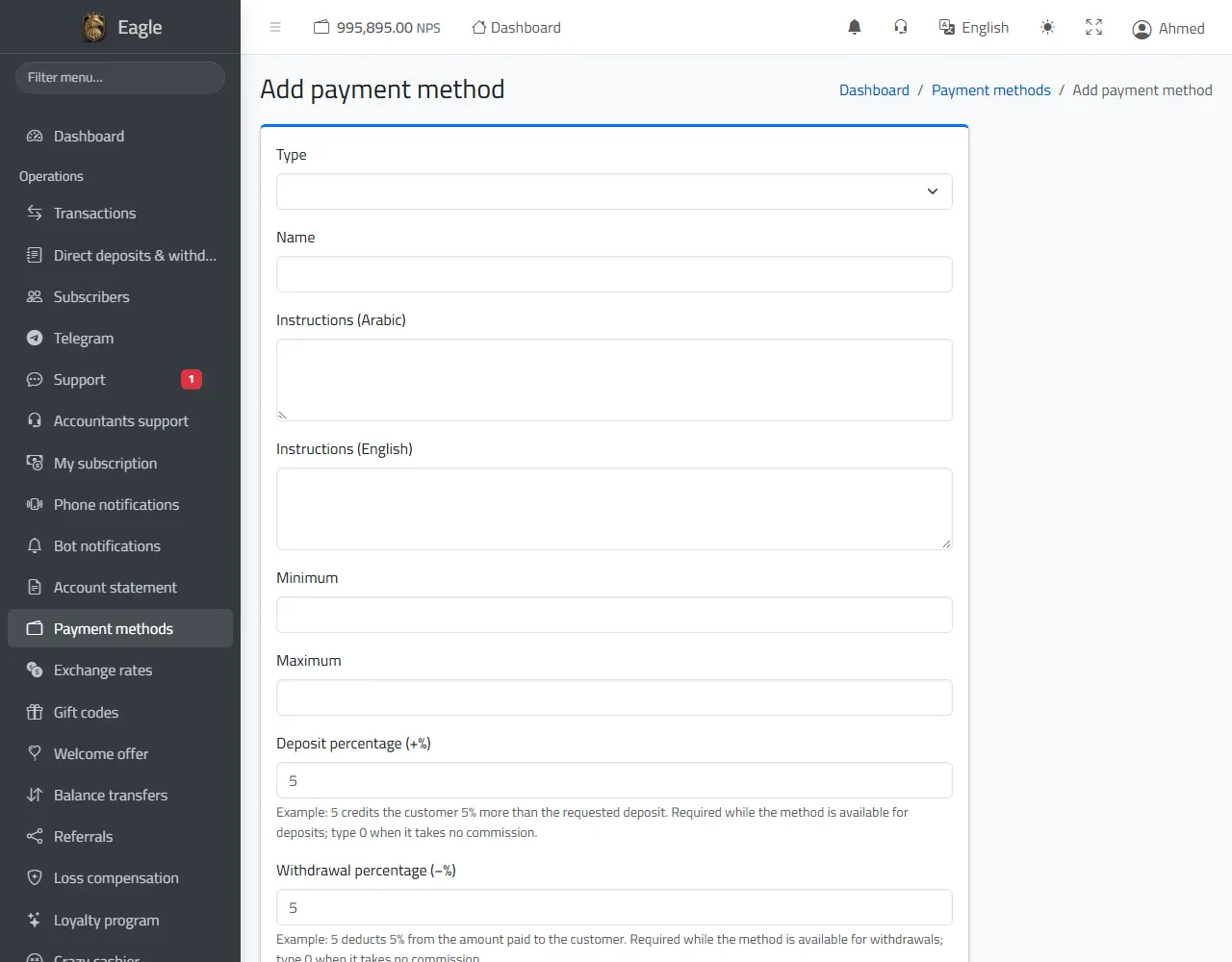
  • For each method: minimum and maximum, deposit rate (+%) and withdrawal rate (−%), available for deposits and/or withdrawals, and the bots that show it.
  • Processing: manual approval, or automatic for Syriatel Cash, ShamCash and USDT (the system checks the transfer arrived and credits without waiting for you).
  • Receiving accounts: the numbers and addresses the customer pays to, shown by the bot with a copy button and a QR code.
  • Payment instructions in Arabic and English, and extra payment currencies at an exchange rate you set.
Payment methods with currency, accounts, offers and status.
A payment method: limits, processing, instructions, receiving accounts and offers.
Adding a payment method: type, limits, rates, processing and bots.

Deposit offers

Under each payment method add offers such as «deposit 100, get 110» or «1,000 or more: 10% extra».

  • An offer for an exact amount or from an amount upwards, with a percentage or fixed bonus and an optional duration.
  • The bot applies the best matching offer automatically and shows it to the customer before paying and on the receipt.
  • The bonus comes out of your net and does not change what the customer pays.

Exchange rates

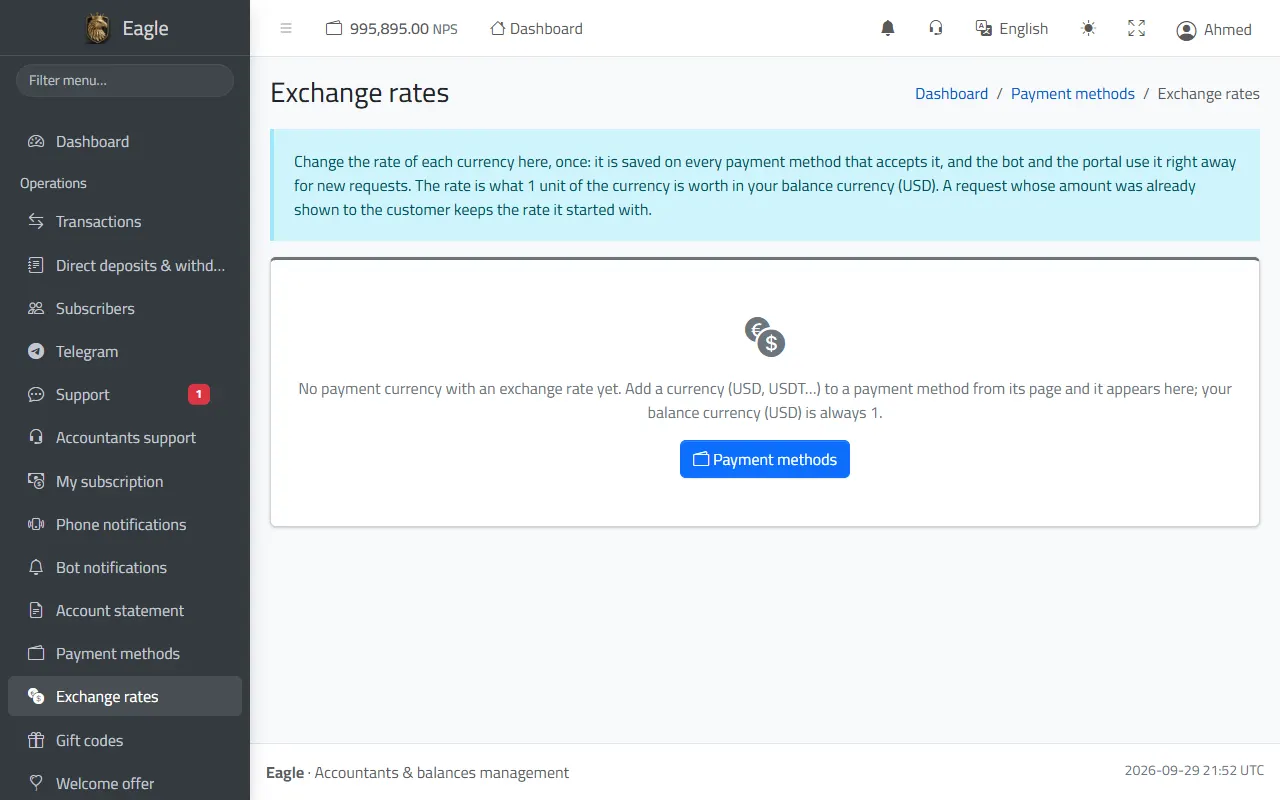
If you accept payments in a currency other than your balance currency, change its rate here once: it applies to every payment method that accepts it, and the bot and the portal use it at once for new requests.

  • Rate = what 1 unit of the currency is worth in your balance currency.
  • A request whose amount was already shown to the customer keeps the rate it started with.
Exchange rates of the payment currencies.

ShamCash and Syriatel Cash (API SYRIA)

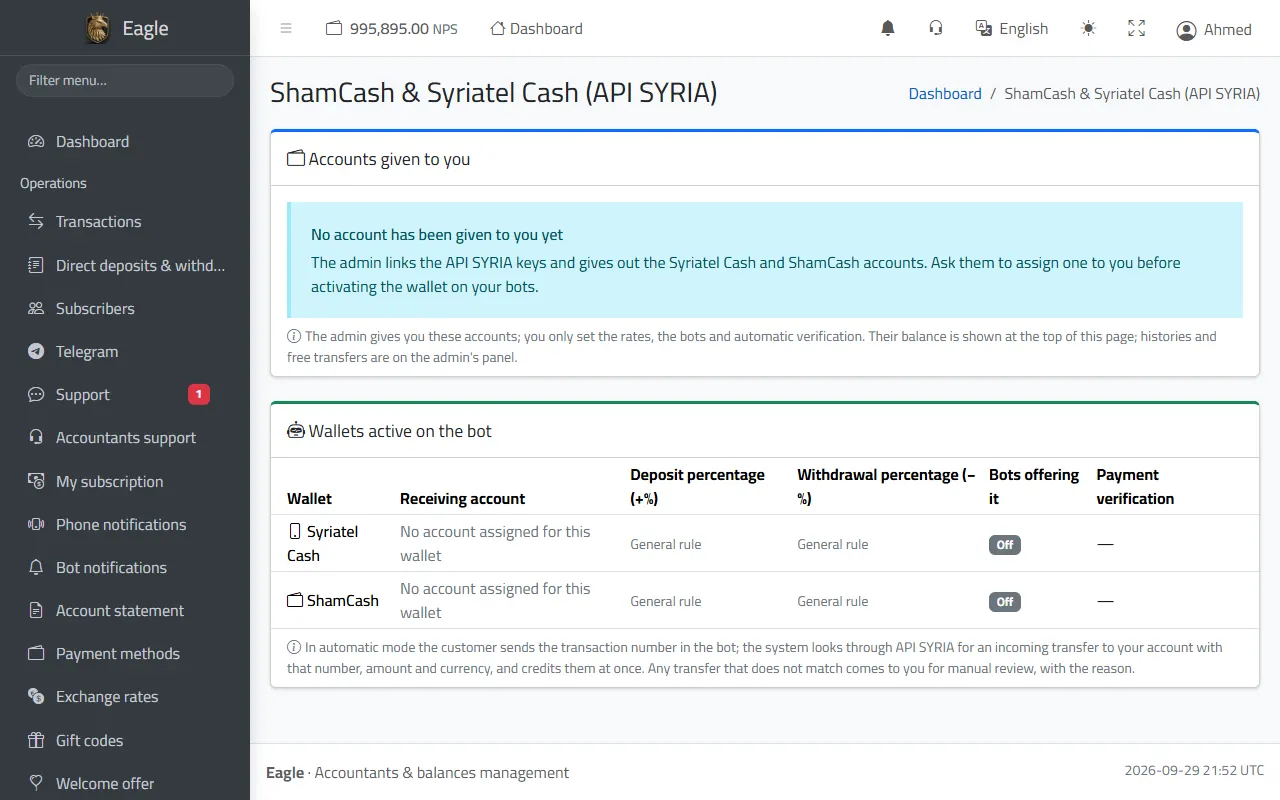
Automatic payment checks: the customer sends the transaction number in the bot, the system looks for the incoming transfer to your account with that number, and credits them at once without waiting for you; a transfer of another amount than typed is credited for what really arrived.

  • The administration connects the API SYRIA key and assigns Syriatel Cash and ShamCash accounts to you; you set the rates, the bots and the automatic check.
  • The balance of each wallet is shown at the top of the page.
  • When the transfer is not found or the number is wrong, the bot tells the customer at once, who checks again or corrects the number; what cannot be settled automatically (below the minimum, another currency, an old transfer) reaches you for a review, with the reason.
  • When the Agent account lacks the balance, the confirmed request waits for you, keeping its transaction number, and the customer is asked to contact you: top up the Agent account, then approve the request.
  • «Money sent»: withdrawals you paid from the panel through API SYRIA. «Used transfers»: every transfer number already used, so none is accepted twice.
ShamCash and Syriatel Cash: accounts assigned to you and the wallets enabled on the bot.

4. Offers and rewards

Gift codes

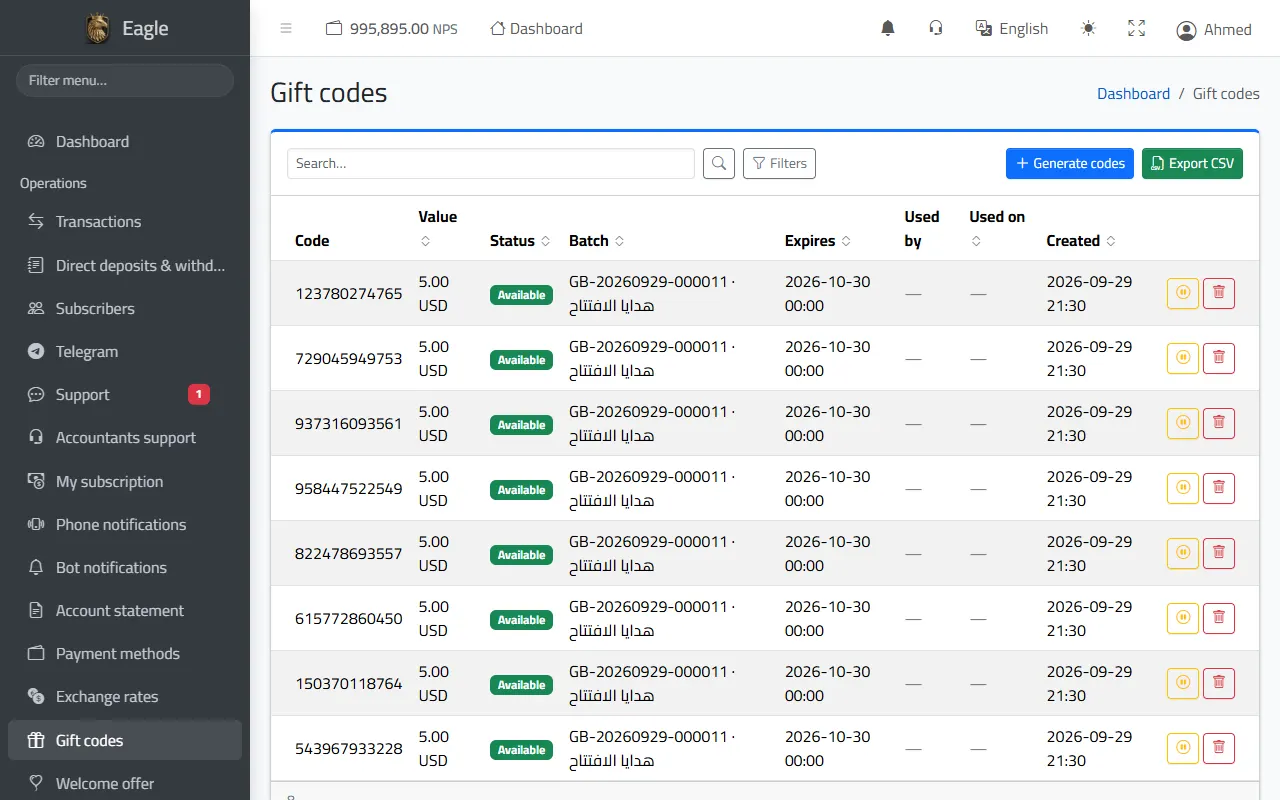
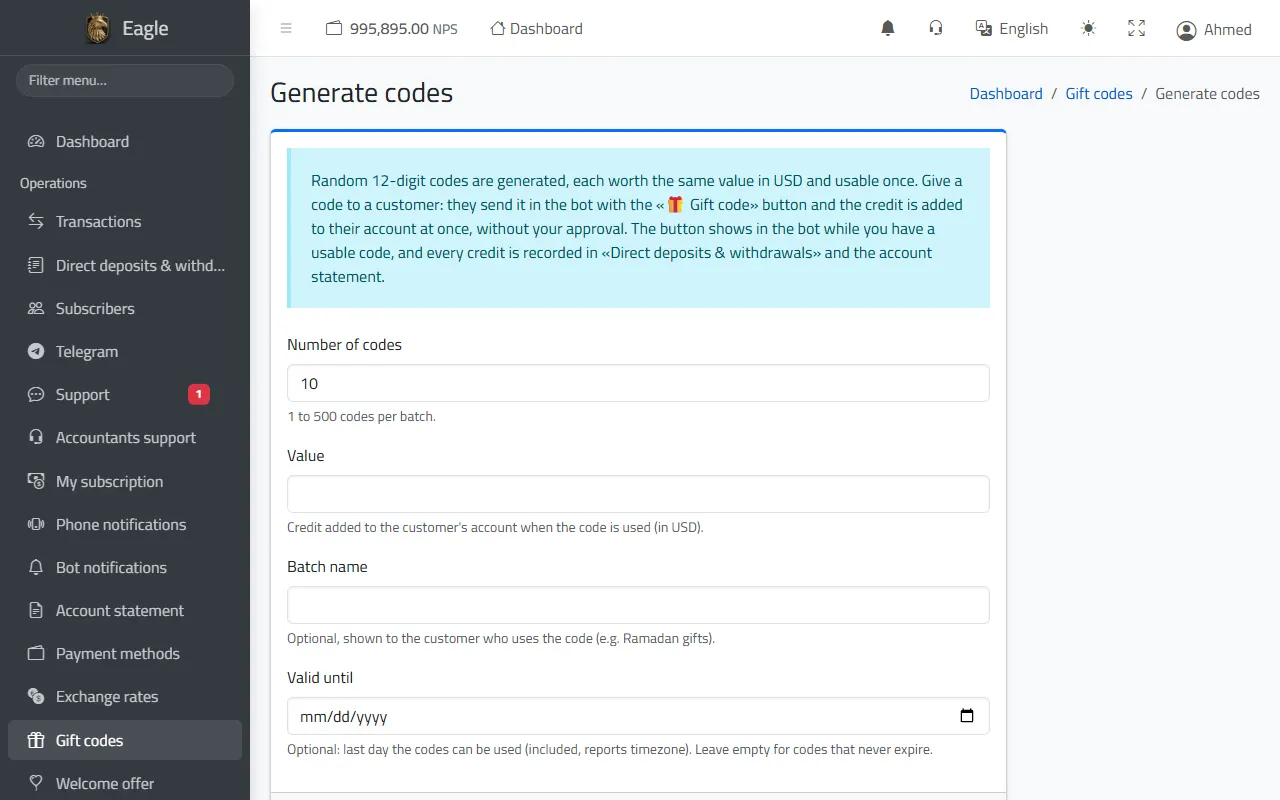
Generate batches of random 12-digit codes, each worth an amount in your currency and usable once. The customer sends the code in the bot with «🎁 Gift code» and is credited at once, without your approval.

  • 1 to 500 codes per batch, with a batch name the customer sees and an optional expiry date.
  • Statuses: available, used (by whom and when), stopped, expired; you can stop or delete a code before it is used.
  • Export the codes to CSV to hand them out.
  • Guessing protection: 5 wrong codes lock the feature for that customer for a full hour.
Gift codes with value, status and batch.
Generating a batch of codes: count, value, name and expiry date.

Welcome offer

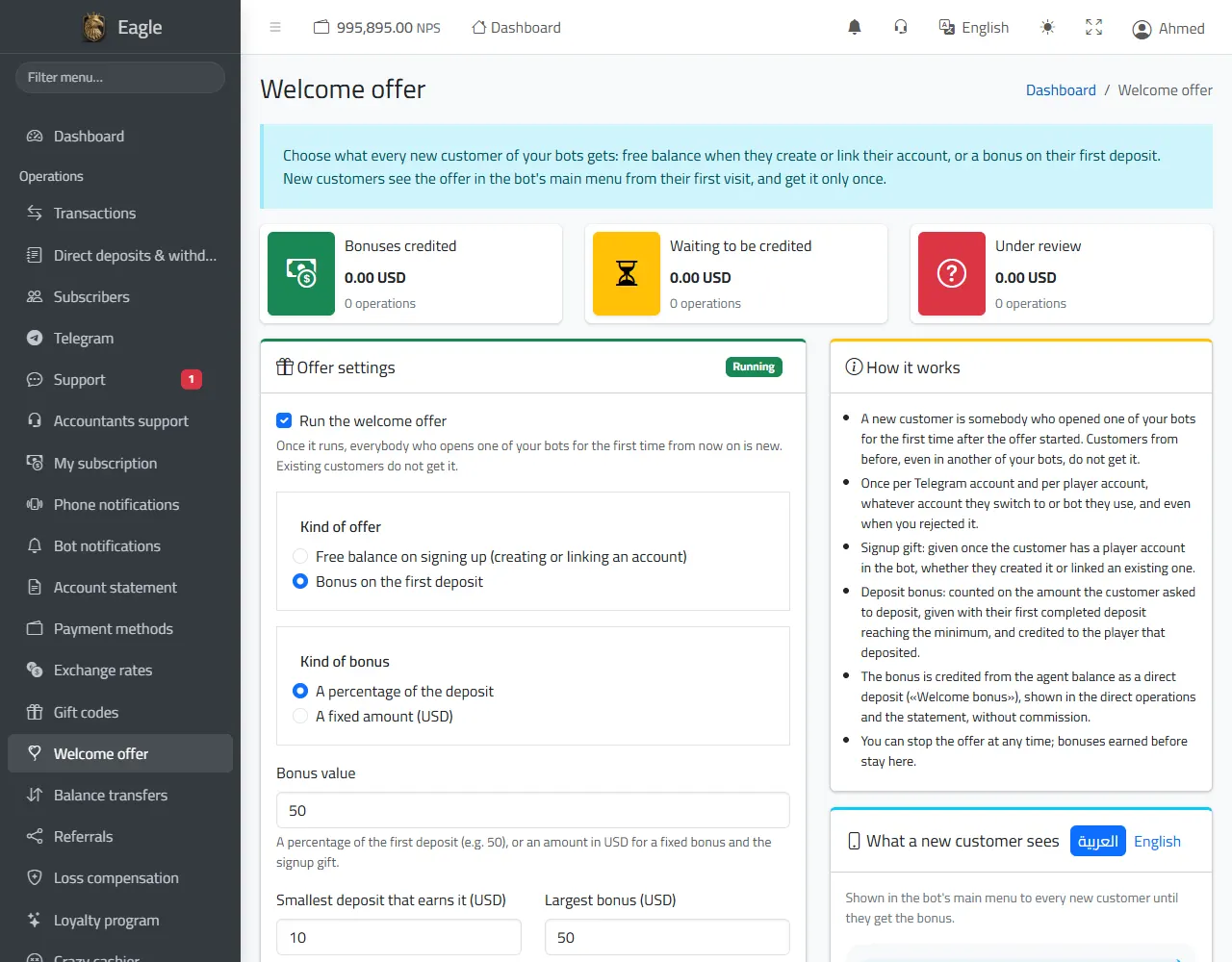
A reward for every new subscriber of your bots: free credit when they create or link their account, or a bonus on their first deposit (percentage or fixed).

  • A minimum qualifying deposit and a maximum bonus.
  • Credited automatically, or waiting for you to press «Credit the bonus».
  • Once per Telegram account and per player account, even through another of your bots.
  • Figures for bonuses credited, waiting and under review, and a full history.
Welcome offer: figures, settings and how it works.

Referral program

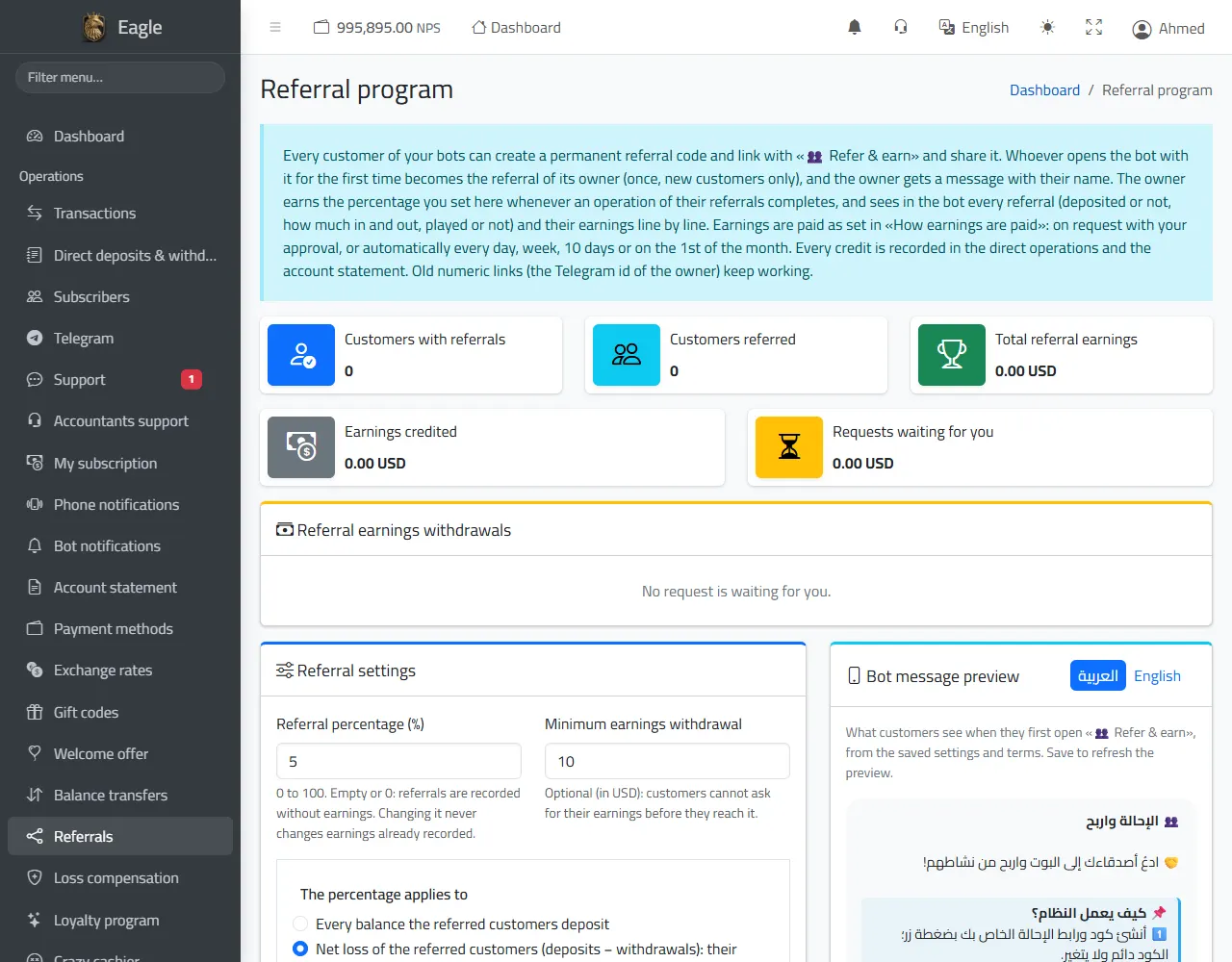
Every customer gets a permanent referral code and link from «👥 Refer & earn». Whoever opens the bot for the first time from that link is recorded for its owner, who earns the rate you set.

  • The rate applies to every deposit of the referred customers, or to their net loss (deposits − withdrawals).
  • Payouts: on request with your approval, or automatically every day, week, 10 days or on the 1st of the month, with a minimum payout.
  • Your own referral terms appear to customers in the bot, with a preview of the message in Arabic and English.
  • Figures, the list of customers with referrals, and payout requests.
Referral program: figures, settings, terms and a preview of the bot message.

Loss compensation

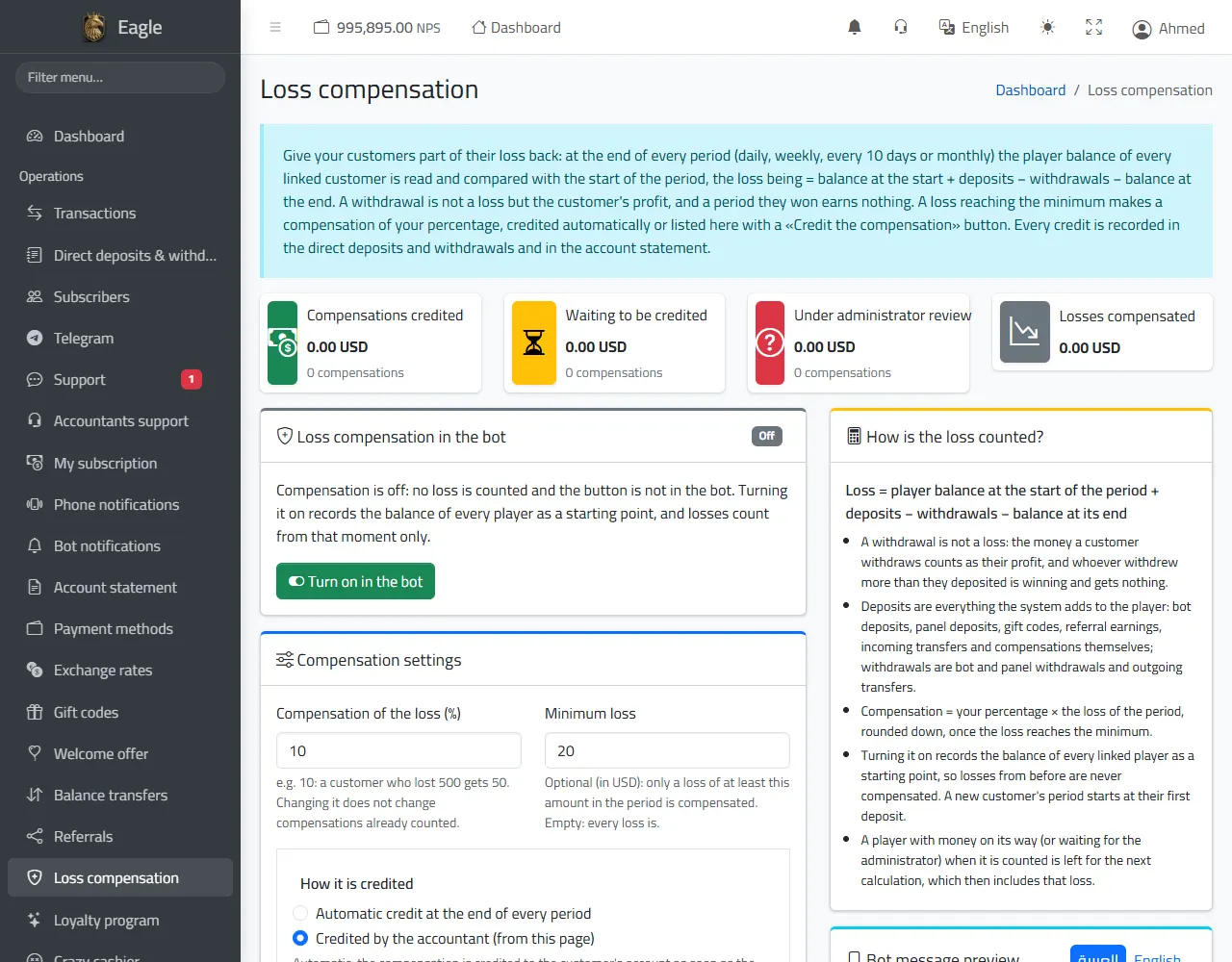
Give your customers back part of their losses every period: daily, weekly, every 10 days or monthly.

  • Loss = opening balance + deposits − withdrawals − closing balance; a withdrawal is not a loss.
  • You set the compensation rate and a minimum loss.
  • Credited automatically at the end of each period, or manually from this page with a button per compensation.
  • The «🛡️ Loss compensation» button in the bot shows the customer their current loss and latest compensations.
Loss compensation: settings, how the loss is computed and a preview of the bot message.

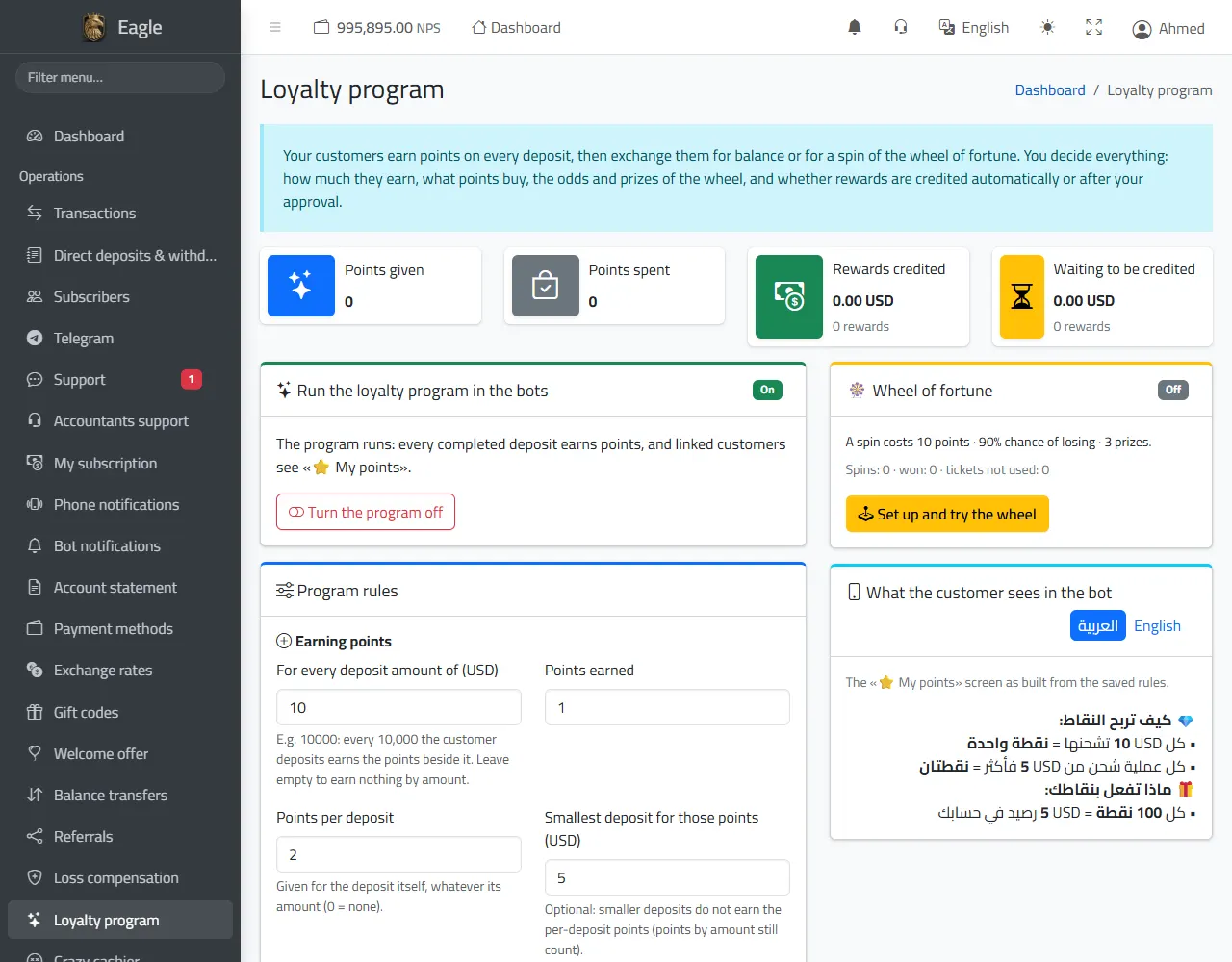
Loyalty program and wheel of fortune

Your customers earn points with every deposit, then exchange them for credit or for a spin of the wheel of fortune.

  • Earning rules: points per deposited amount and points per deposit, with an optional minimum.
  • Exchange: a number of points equals an amount of credit you choose.
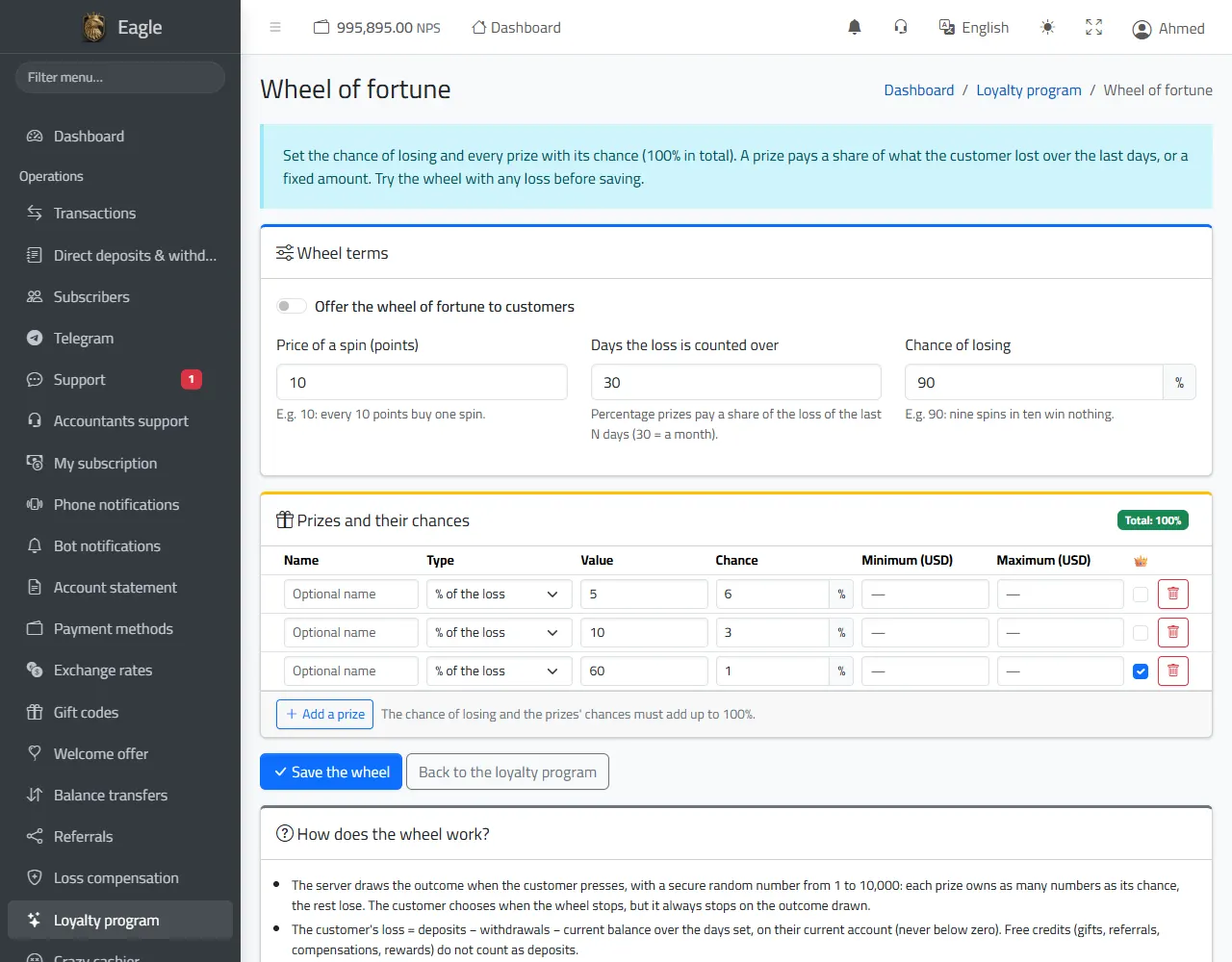
  • The wheel: price of a spin in points, chance of losing, and prizes (a share of the customer''s loss or a fixed amount) whose chances add up to 100%, with a test before saving.
  • The server decides each result with a secure random number; rewards are credited automatically or after your approval.
Loyalty program: earning and exchange rules, and the wheel of fortune.
Setting up the wheel of fortune: prizes and their chances.

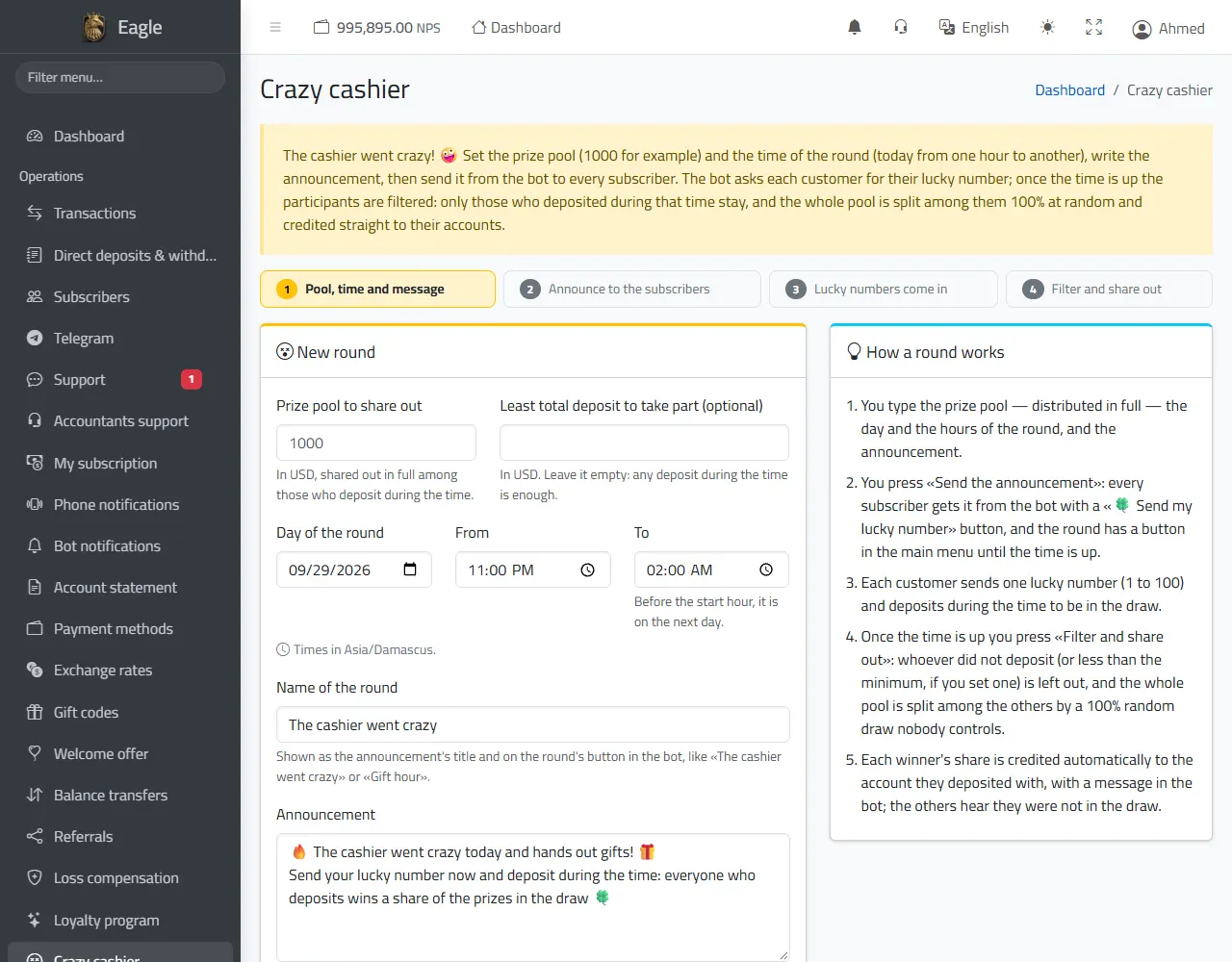
The «Crazy cashier»: a prize round

Set an amount to share out entirely, the round's time and an announcement: the bot sends it to all your subscribers, each sends a lucky number and deposits during the round.

  • After the round, «Filter and share out»: only those who deposited during the round stay (reaching the minimum if you set one).
  • The amount is split among them by a 100% random draw, and each winner''s share is credited automatically with a notification.
  • A preview of the announcement before sending, and a history of all rounds.
The «Crazy cashier»: the steps of a round and the new round form.

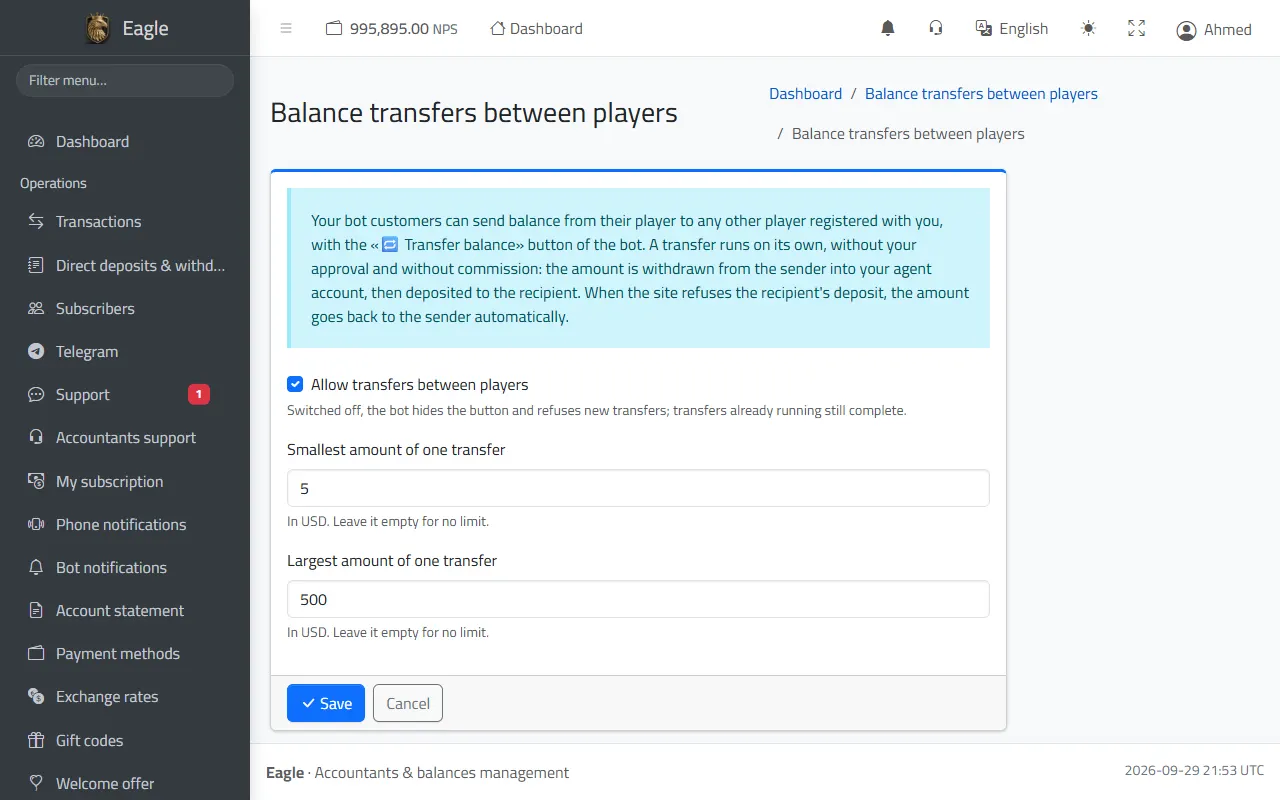
Balance transfers between players

Your customers can send credit to any other player of yours with «🔁 Transfer balance» in the bot, automatically and without a fee.

  • Minimum and maximum per transfer, or switch the feature off entirely.
  • The amount is taken from the sender and then deposited to the recipient; if the deposit is refused, it goes back to the sender automatically.
  • A full history of the transfers and their statuses.
Settings of balance transfers between players.

5. Bots and customers

Bots and promotion channel

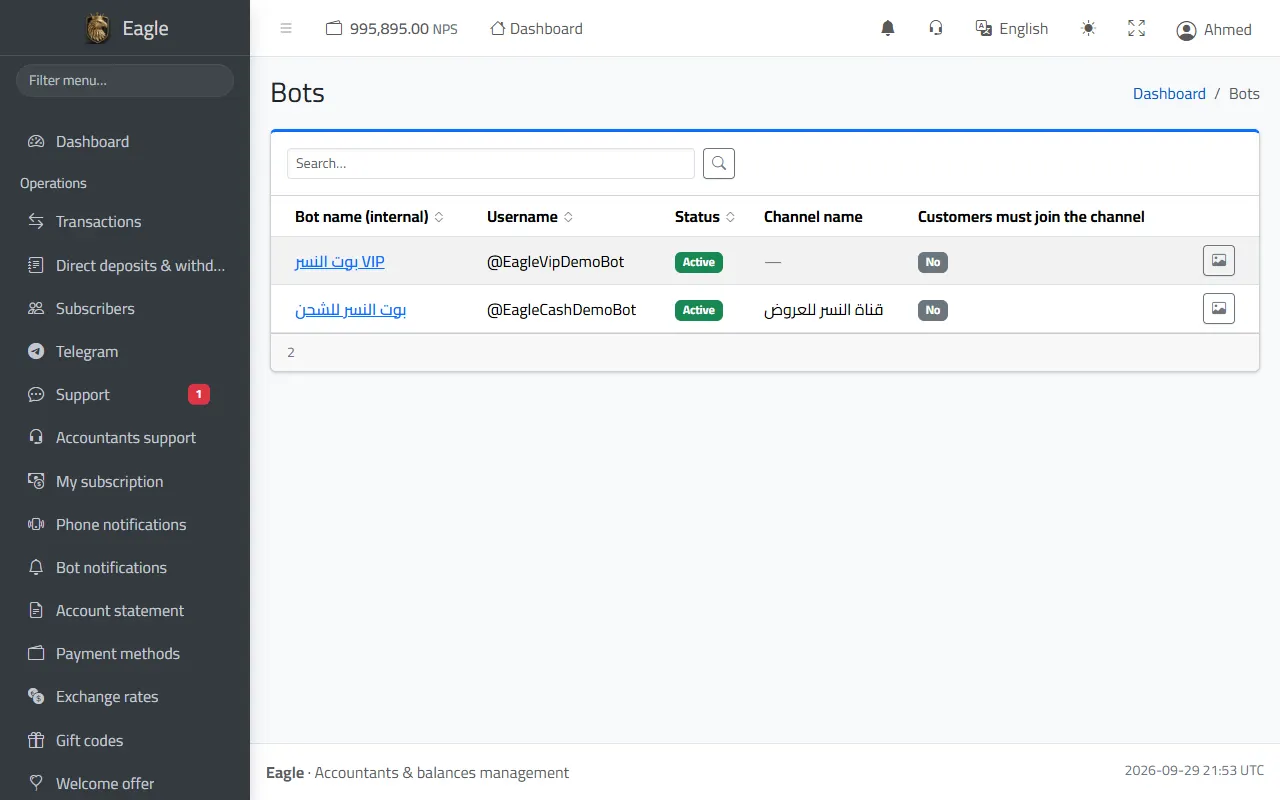
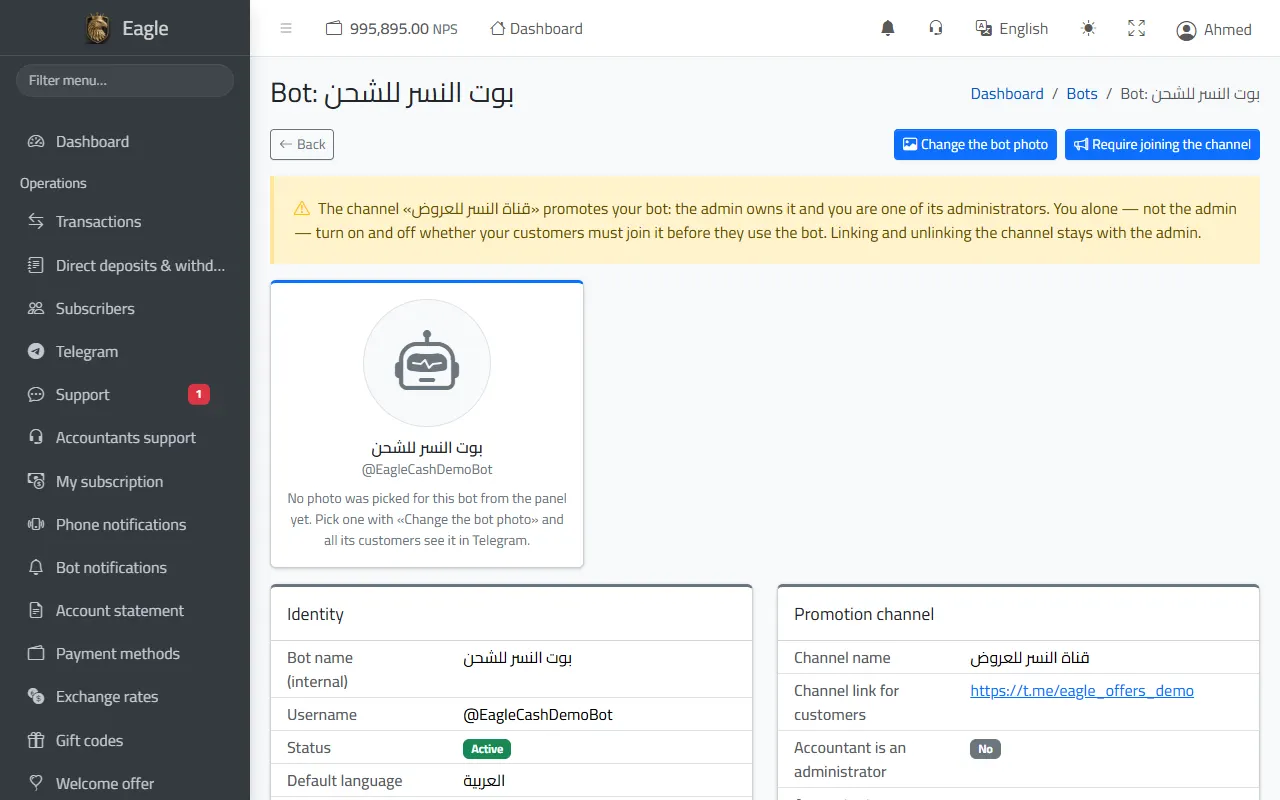
Your bots with their username, status and channel, and a page per bot with its identity, customer link and the payment methods it shows.

  • «Change the bot photo»: choose its photo, shown to all its customers in Telegram.
  • Promotion channel: owned by the administration with you as an administrator; you alone switch on or off making customers join it before using the bot.
  • The bot''s default language; customers switch between Arabic and English with a button.
The bots with username, status and channel.
A bot page: identity, promotion channel and mandatory subscription.

Bot terms

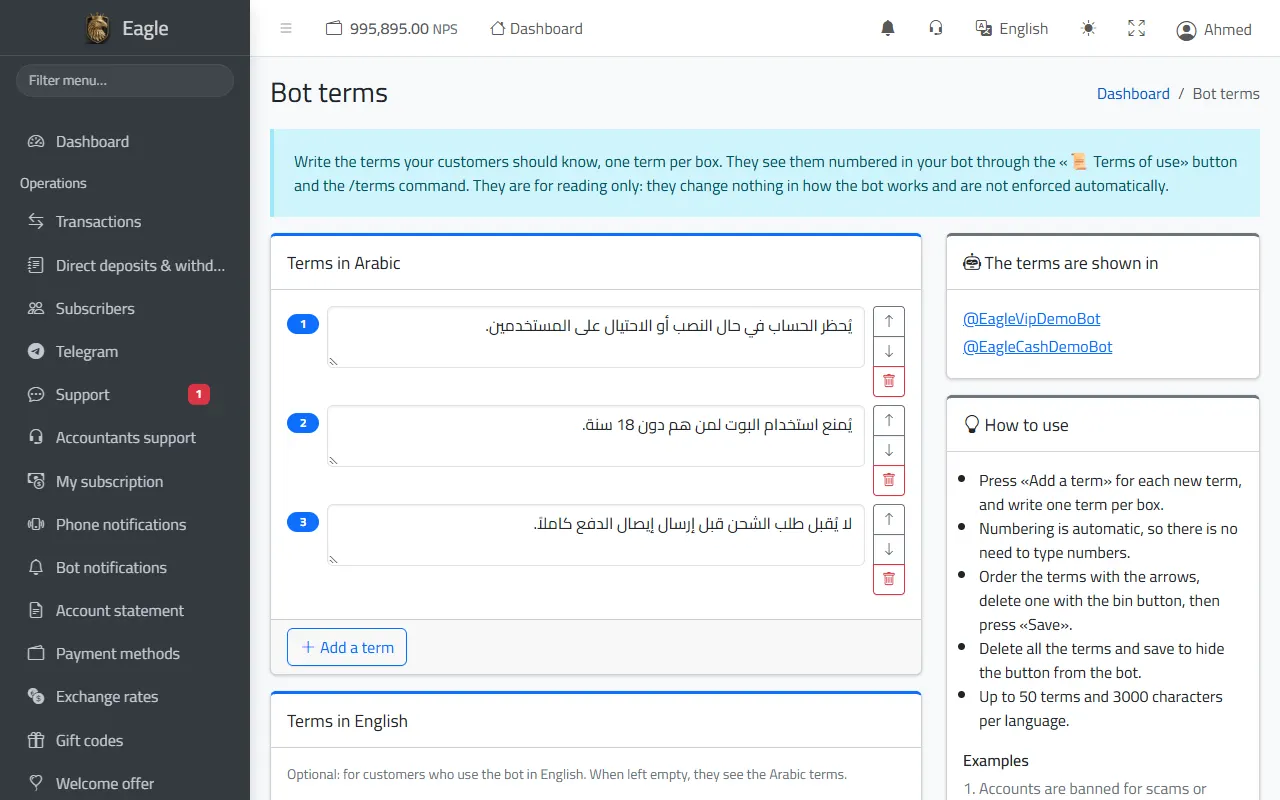
Write the terms of use for your customers, one per box; they appear numbered in the bot under «📜 Terms of use» and the /terms command.

  • In Arabic and English, up to 50 terms, reordered with the arrows or deleted.
  • Deleting all the terms hides the button from the bot.
Bot terms as customers see them.

Customer portal

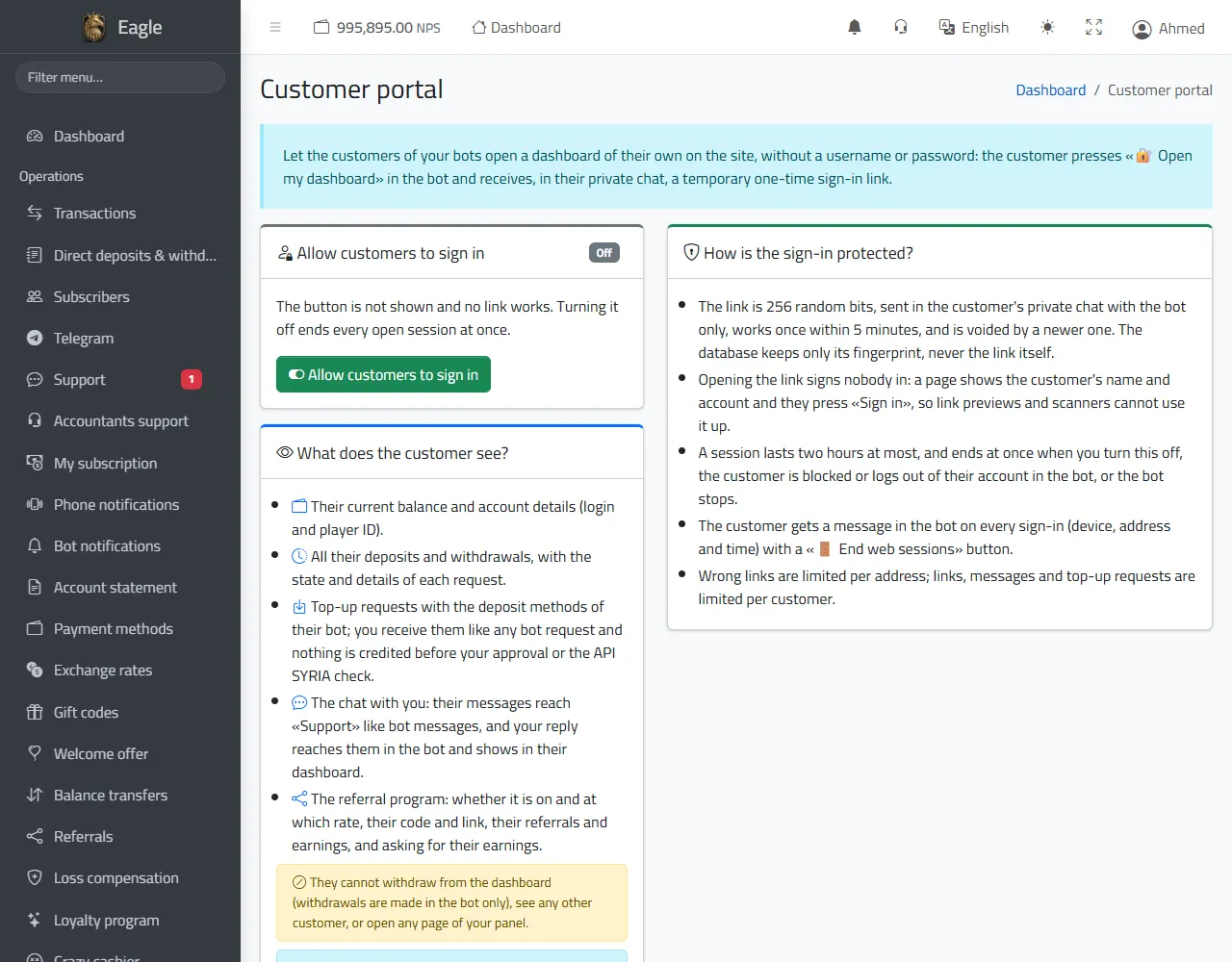
A private page on the website for each subscriber, without a password: they press «🔐 Open my dashboard» in the bot and receive a one-time sign-in link.

  • They see their balance and all their deposits and withdrawals, ask for a deposit, message you and follow their referrals and earnings.
  • They cannot withdraw from the portal, see any other subscriber, or reach your panel.
  • The link works once within 5 minutes, a session lasts 2 hours at most, and the subscriber is notified of every sign-in.
  • «🔑 Recover password» is available to all your subscribers even while the portal is off.
Customer portal: switching it on, what the subscriber sees and how sign-in is protected.

What your customer sees in the bot

A new customer sees «🆕 Create a new account» and «🔗 Link an existing account». Once their player account is linked, the main menu appears:

  • 💳 Deposit and 💸 Withdraw with the payment methods you enabled, with offers and instructions.
  • 💰 My balance and 📜 My transactions: a statement of everything that moved their balance.
  • 🎁 Gift code, 👥 Refer & earn, 🛡️ Loss compensation, ⭐ My points, 🔁 Transfer balance — depending on what you enabled.
  • 💬 Support, 📜 Terms of use, 🌐 English / العربية, 🔄 Switch account, 🚪 Log out, 🔑 Recover password, 🔐 Open my dashboard.

6. The Agent platform (cashier)

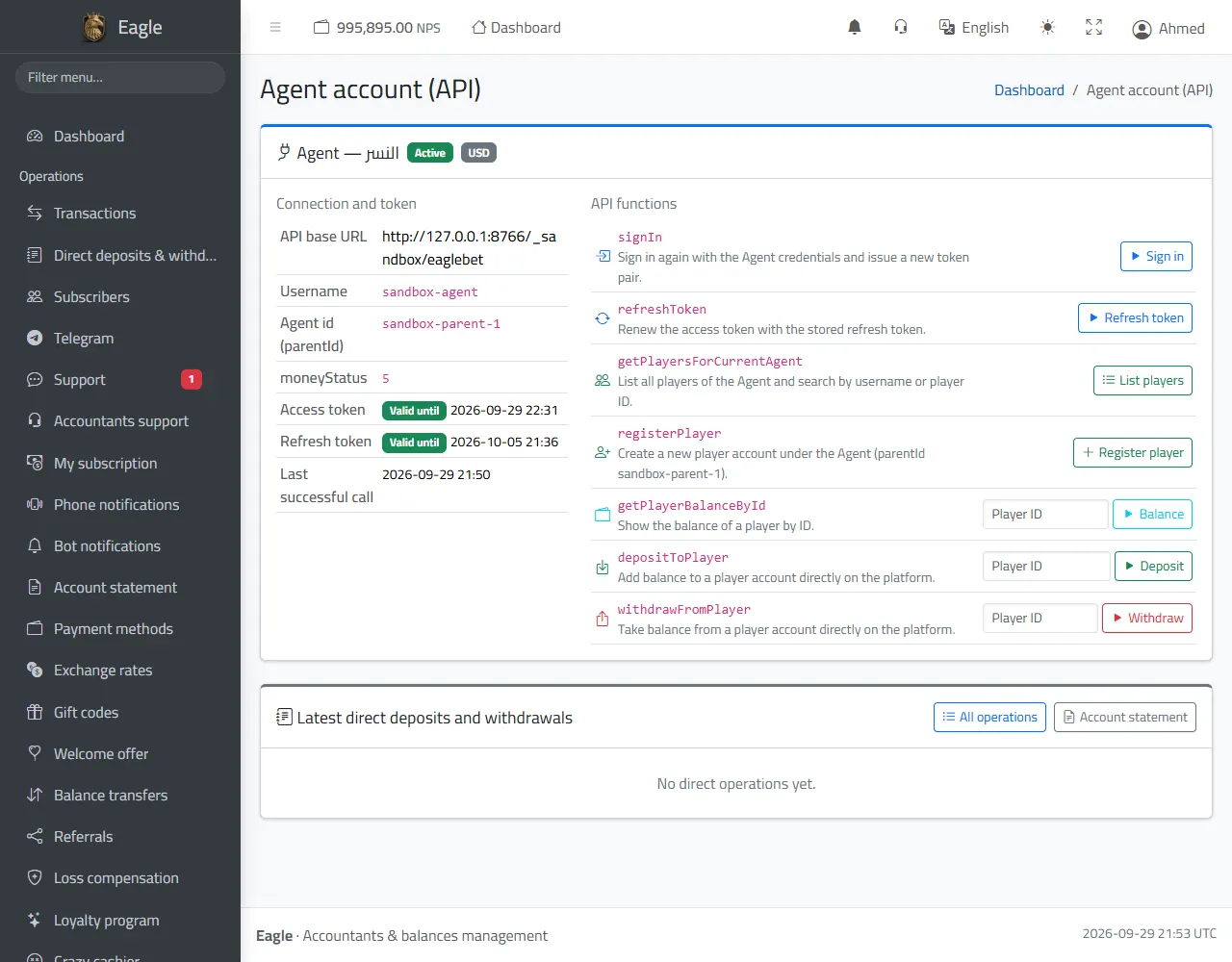
Agent account (API)

The link between your cashier and the system: API address, username, Agent id, token validity and the last successful call.

  • Buttons to try the API functions: sign in, refresh the token, list players, register a player, balance, deposit and withdrawal.
  • The latest direct operations and a link to the statement.
The platform allows a single token per Agent: signing in with the cashier's details from another program disconnects the system until it signs in again.
Agent account: connection, tokens and API functions.

Players and the player page

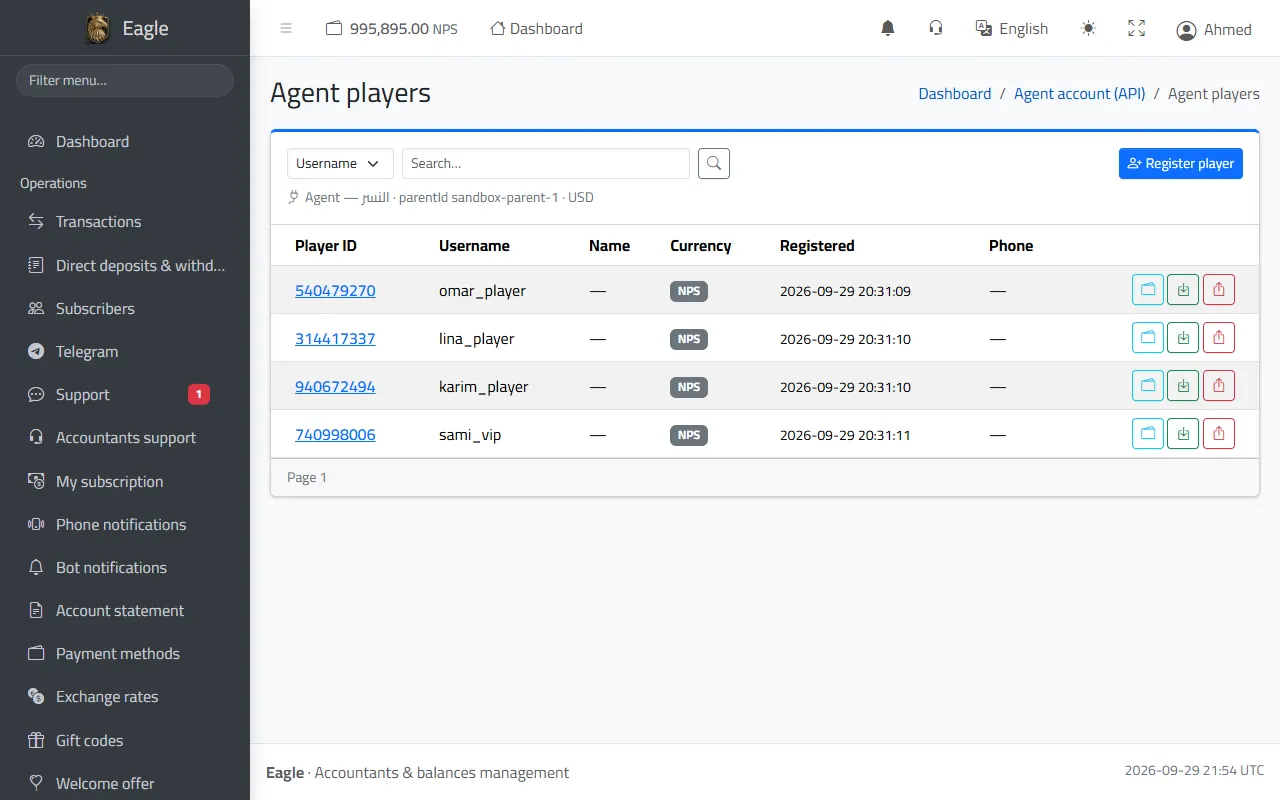
All the players of your Agent, straight from the platform, searchable by username or player number, with balance, deposit and withdrawal buttons.

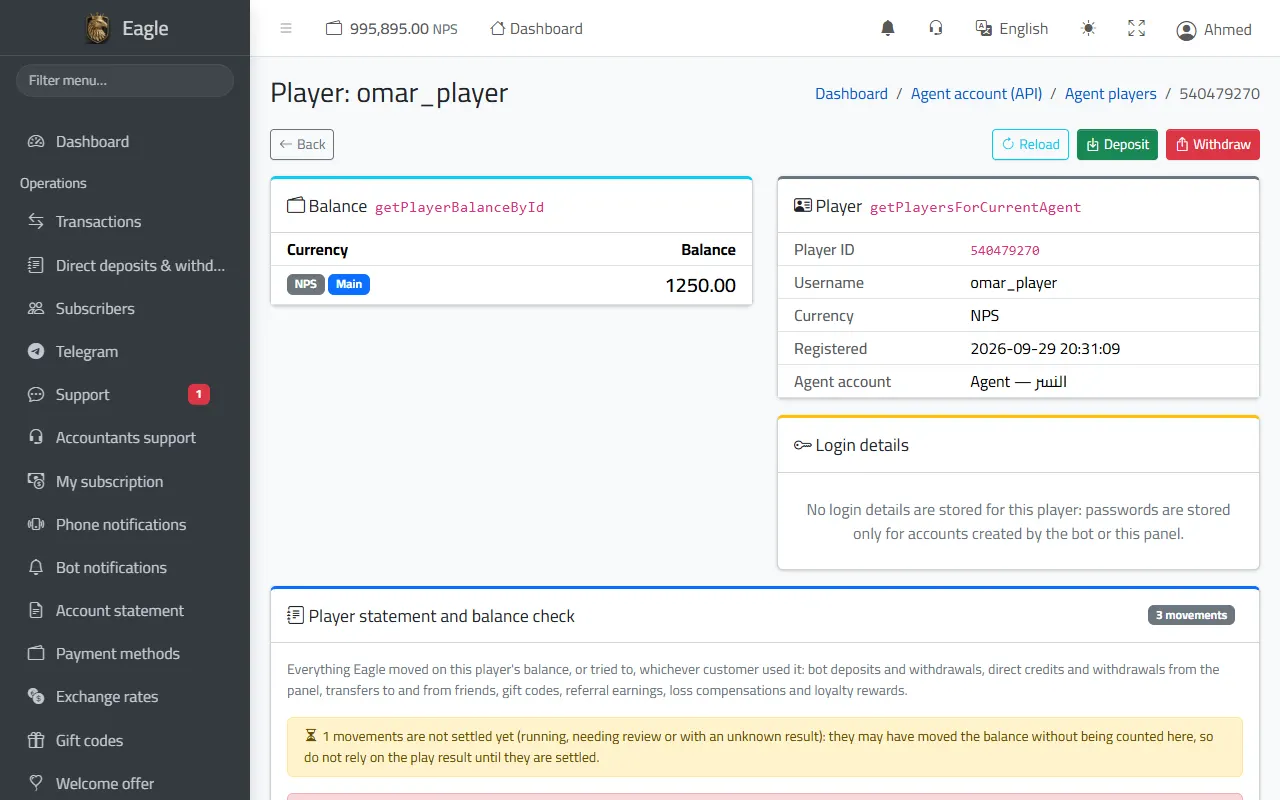
  • The player page: live balance, details, and «Show password» for accounts created by the bot or the panel (each view is written to the audit log).
  • Direct deposits and withdrawals, with your account password each time.
  • The player''s statement and balance check: everything the system moved on their balance, the expected balance, and their playing result (win or loss).
The Agent's players, straight from the platform.
A player page: live balance, details and the player's statement.

Register a new player

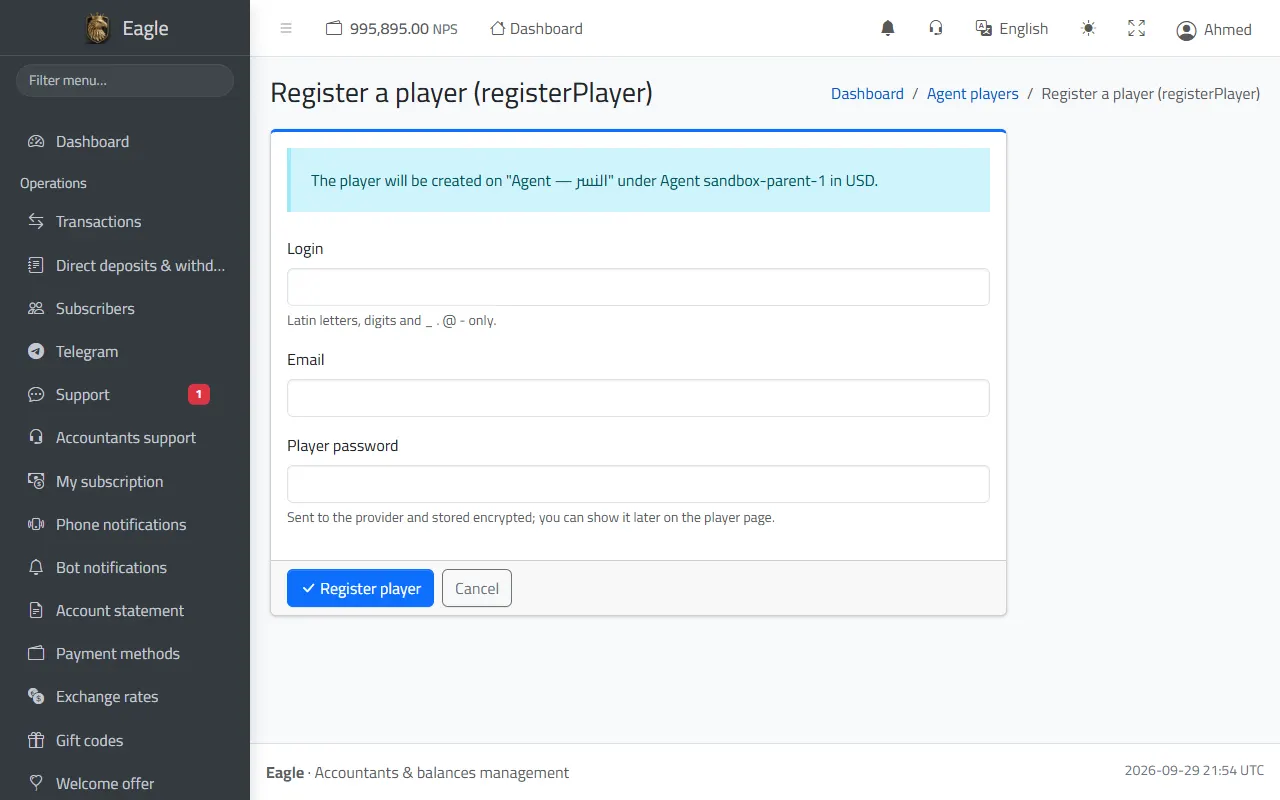
Create a player account on the platform straight from the panel: login, email and password.

  • The player is created under your Agent account, in your currency.
  • The password is stored encrypted and can be shown later on the player page.
Registering a new player on the platform from the panel.

7. Subscription, account and security

My subscription

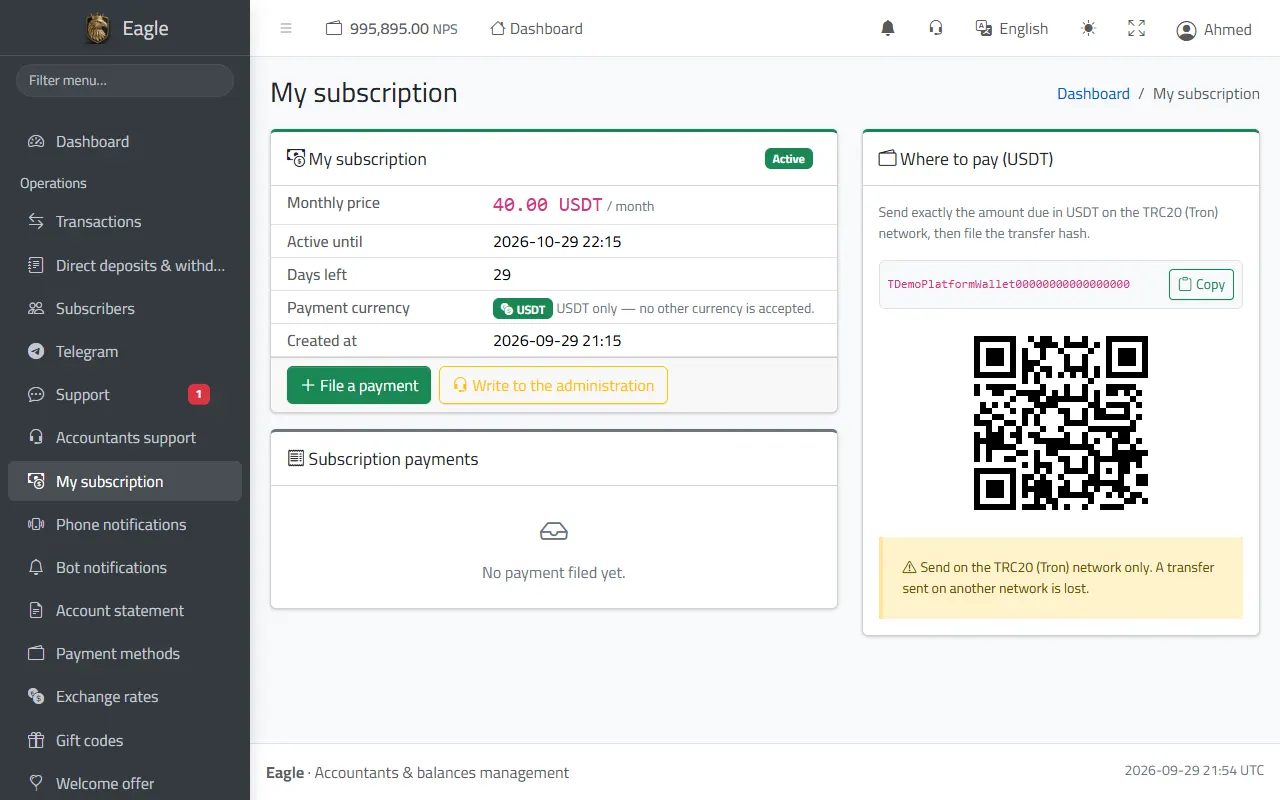
Your monthly subscription: price, valid until, days left and the payment history.

  • Payment in USDT only, to the platform wallet shown on the page, then «File a payment» with the transfer hash and the number of months.
  • The administration checks the transfer on the chain and your subscription is extended at once.
  • Reminders reach you before it ends; after the grace period the bots stop until you pay, while the panel stays open to pay and to message the administration.
My subscription: status, price, valid until, and the USDT payment wallet.

Account settings and two-step verification

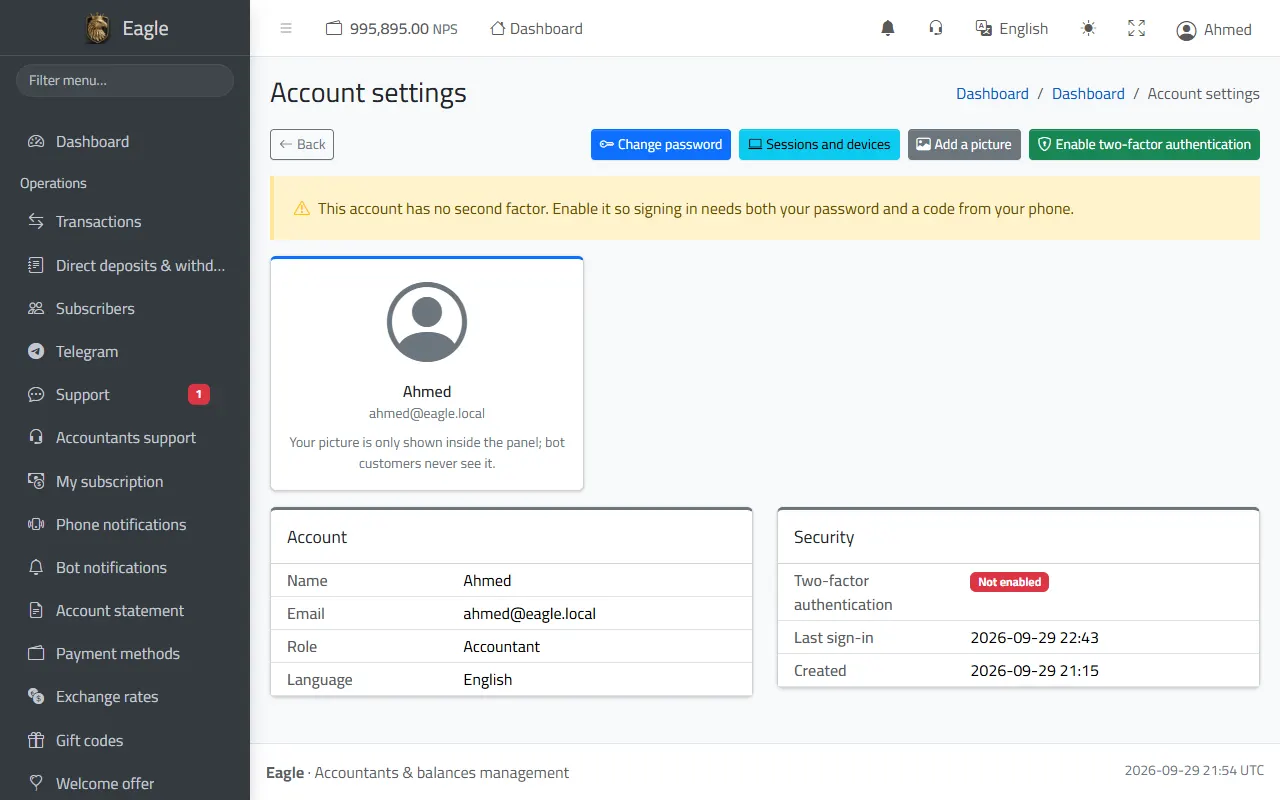
Your account details, password change, profile picture and panel language.

  • Two-step verification: your password + a code from the authenticator app on your phone; the administration requires it on accountant accounts to protect your money.
  • «Remember me on this device» keeps you signed in for 7 days on your own device.
Account settings: password, picture and two-step verification.

Sessions and devices

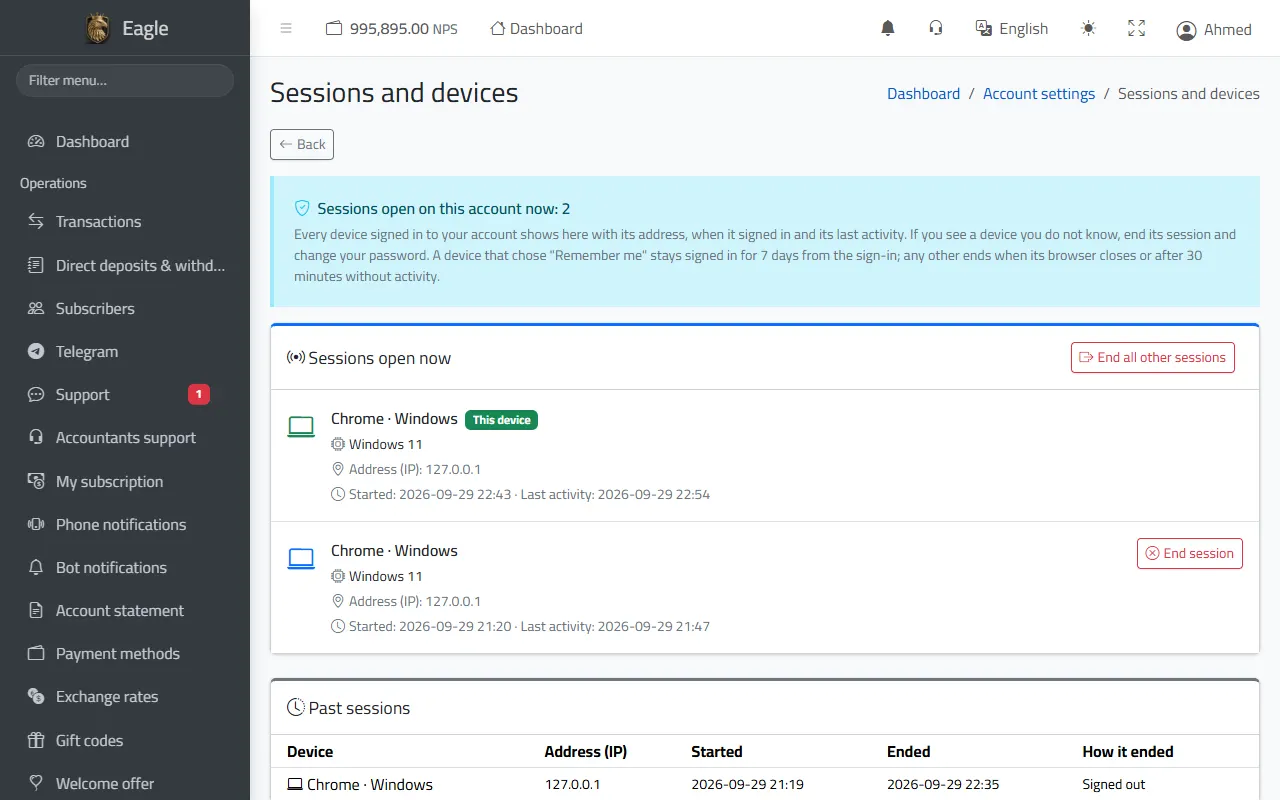
Every device that signed in to your account: its type, address, sign-in time and last activity.

  • End any session you do not recognise, or all the other sessions at once, then change your password.
  • Sign-in and security log: every sign-in and failed attempt with address and device.
Sessions and devices, and the sign-in log.

Audit log

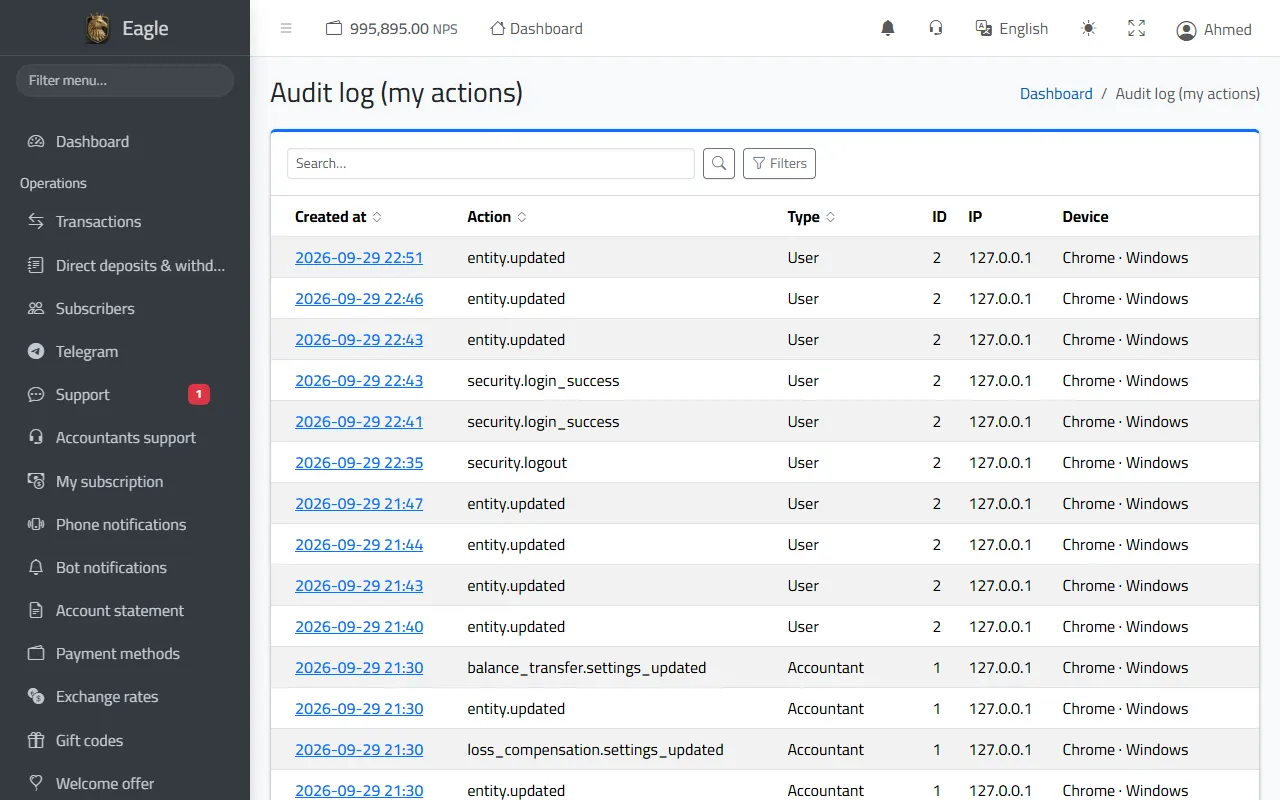
Everything you did in the panel is recorded with date, address and device: sign-ins, approvals, direct deposits, settings changes and password views.

  • Read only: it can be neither edited nor deleted.
  • Filters by action and date.
The audit log of your actions.
The pictures use demo data (made-up names and numbers); a few pages may look slightly different after updates.

Contact us

Message us to get your bot within minutes.
We work with ⁦eaglebet99⁩ — www.eaglebet99.com